| Contents | ||||||||||||
| Introduction | ||||||||||||
| In the previous article "Tutorial on Basics of NIC, MAC and ARP" [Reference 1], I wrote about some of the basic network terms NIC, IP Address, MAC & ARP etc. | ||||||||||||
 |
||||||||||||
| Here I will explain in depth about ARP Spoofing, how it can be used to perform local sniffing and possible solutions to protect against such attacks. | ||||||||||||
| ARP Spoofing/Flooding/Poisoning | ||||||||||||
| ARP Spoofing is one of the predominent
attacks executed in local network. This attack involves sending fake or
spoofed ARP messages onto a LAN. It is possible to update a host's ARP cache with false information via spoofed ARP Replies. This technique is known as 'ARP Poisoning' and is the basis of more complex attacks. The most dangerous amongst them is Sniffing . Poisoning can also help in causing DoS type of attack too but here we will primilarly focus on Sniffing the network data. Sniffing is the term used to describe the reading of all packets on a network segment. This is relatively easy on a network connected via a hub as ethernet is a broadcast medium and the attacker would only have to place his NIC in promiscuous mode to 'sniff' all traffic on that network segment. In a switched network this is not possible. This is because a switch builds a table of MAC addresses and their associated ports when the switch is powered on. When a host transmits an ethernet frame the switch examines the destination MAC address and routes the frame to the associated port as given in the switch table. Therefore it is not possible to sniff any traffic on the network. There are two methods to sniff traffic in a switched environment using ARP Poisoning. The first is for the attacker to send flood of spoofed ARP Replies to the switch. The switch will process these replies, updating its routing table. If this is done at a rapid rate the switches table will overflow and the switch will default to broadcast all traffic to all ports like Hub. The attacker can now 'sniff' all network traffic. |
||||||||||||
 |
||||||||||||
| The second method involves a 'man in the
middle' (MITM) style attack. I will explain this technique in detail by
aid of an example. Below is a simple network segment with three hosts in
a switched environment. The attacker wishes to sniff all traffic that A sends to B and visa versa. This is currently not possible as the attacker is connected to the network via a switch. The correct IP addresses and MAC addresses for each host are as follows: |
||||||||||||
|
||||||||||||
| Firstly the Attacker will poison A's ARP cache with a spoofed ARP Reply. The ARP reply will tell A that the IP address of B now has a MAC address of 00:00:00:00:00:04. Once A has processed the ARP Reply its ARP cache will look like this: | ||||||||||||
|
||||||||||||
| Secondly the Attacker will poison B's ARP cache with a spoofed ARP Reply. The ARP reply will tell B that the IP address of A now has a MAC address of 00:00:00:00:00:04. Once B has processed the ARP Reply its ARP cache will look like this: | ||||||||||||
|
||||||||||||
| Now whenever A sends B an ethernet frame the switch will route it to
the attackers port, this will also be the case whenever B sends A an
ethernet frame. The attacker may now 'sniff' the traffic whilst
forwarding it on to its originally desired host. The thing to keep in mind here is that the attacker must perform the two way poisoning so that it can recieve the packets as well as send it to the destination. In this way the connection will always be alive between the two communicating hosts and the attack will perform successfully. |
||||||||||||
| Detection & Mitigation | ||||||||||||
| One of the solution to prevent ARP cache
from being poisoned there by protect against ARP Spoofing, is to add
static IP-MAC entries to the cache. If an ARP cache has been made static
it will not process any ARP Replies received unlike a dynamic ARP cache.
However this is not practical for large networks as the correct IP address to MAC address association of every host would have to be present in the cache of every host before it is made static. If one host changed its MAC address (e.g. after replacing a NIC) all hosts ARP caches would need to be updated manually. On windows, a login script could automate this process however it has been reported Windows will still accept and process ARP Replies even when the ARP cache has been made static. Other solution, is to use Intrusion Detection Systems (IDS) to detect ARP Poisoning attacks. You can also use tool, ArpWatch [Reference 2] to monitor against such ARP spoofing attacks on the local network. | ||||||||||||
| ARP Spoofing Demonstration | ||||||||||||
| Here is very good flash demonstration (obtained from oxid) which will help you to understand entire 'ARP Spoofing' operation. | ||||||||||||
| http://www.securityxploded.com/arp-spoofing.swf | ||||||||||||
| References | ||||||||||||
| Conclusion | ||||||||||||
| Hope this tutorial has helped to clear out the basics of ARP Spoofing, its attack vector and possible way to detect/mitigate such attacks. |
Wednesday, 29 February 2012

PDF Overview - Peering into the Internals of PDF
| Contents | ||
| Introduction | ||
|
||
| In this introductory article I will explain the internals of PDF document, its structures and components with examples and screenshots. It will help you understand intrinsics of PDF document and will be more useful if you are into PDF malware analysis. | ||
| Components of PDF File | ||
PDF syntax consists of four main
components:
|
||
| ||
| PDF Objects | ||
| A PDF file consists primarily of objects, of which there are eight types: | ||
| ||
| I will explain more details about each of these objects in detail in the following section. | ||
| PDF Objects -> Strings | ||
| String objects can be represented in two ways: | ||
| ||
| Literal Strings consists of any number of characters between opening and closing parenthesis. | ||
| Example (This is a string objects) If string is too long then it can be represented using backslash as shown below (This is a very long\ String.) Hexadecimal Strings consists of hexadecimal character enclose with angel bracket Example: <A0C1D2E3F1> | ||
| Here each pair of hexadecimal defines one byte of string. | ||
| PDF Objects -> Names | ||
| A names object is uniquely defined by sequence of characters. Slash character(/) defined a name. | ||
| Example /secsavvy /SecSavvy Both are different name. /Sec#20Savvy mean Sec Savvy 20 is hexadecimal value for white space. Note: Pdf is case-sensitive. | ||
| PDF Objects -> Array | ||
| An array object is collection of objects. PDF array object can be heterogeneous. It is defined with square brackets. | ||
| Example [1 (string) /Name 3.14] | ||
| PDF Objects -> Dictionary | ||
| Dictionary object consists of pairs of
objects. The first element is key and the second is value. The key must be name. A dictionary is written as a sequence of key-value pairs enclosed in double angle brackets (<< � >>). | ||
| Example << /Type /Pages /Kids [ 4 0 R ] /Count 1 >> Count is a key and 1 is value. | ||
| PDF Objects -> Streams | ||
| A stream object, like a string object, is
a sequence of bytes. Stream can be of unlimited length, whereas a
string is subject to an implementation limit. For this reason,
objects with potentially large amounts of data, such as images and
page descriptions, are represented as streams. A stream consists of a dictionary followed by zero or more bytes bracketed between the keywords stream and endstream: | ||
| dictionary stream ... Zero or more bytes ... endstream | ||
| PDF Objects -> Indirect Ones | ||
| Objects may be labeled so that they can be referred to by other objects. A labeled object is called an indirect object. | ||
|
Example Consider this object obj and endobj is a keyword. 10 0 obj (SecSavvy String) endobj This object defined a string of object number 10. This object can be referred in a file by indirect reference as 10 0 R | ||
| PDF Objects -> Streams -> Filters | ||
| A filter is an optional part of the
specification of a stream, indicating how the data in the stream
must be decoded before it is used. For example, if a stream has an
ASCIIHexDecode filter, an application reading the data in that
stream will transform the ASCII hexadecimal-encoded data in the
stream into binary data. For data encoded using LZW and ASCII base-85 encoding (in that order) can be decoded using the following entry in the stream dictionary: /Filter [ /ASCII85Decode /LZWDecode ] | ||
| Example1 0 obj << /Length 534 /Filter [ /ASCII85Decode /LZWDecode ]>> stream J..)6T`?p&<!J9%_[umg"B7/Z7KNXbN'S+,*Q/&"OLT'FLIDK#!n`$"<Atdi`\Vn%b%)&'cA*VnK\CJY(sF>c!Jnl@RM]WM;jjH6Gnc75idkL5]+cPZKEBPWdR>FF(kj1_R%W_d&/jS!;iuad7h?[L-F$+]]0A3Ck*$I0KZ?;<)CJtqi65XbVc3\n5ua:Q/=0$W<#N3U;H,MQKqfg1?:lUpR;6oN[C2E4ZNr8Udn.'p+?#X+1>0Kuk$bCDF/(3fL5]Oq)^kJZ!C2H1'TO]Rl?Q:&�<5&iP!$Rq;BXRecDN[IJB`,)o8XJOSJ9sDS]hQ;Rj@!ND)bD_q&C\g:inYC%)&u#:u,M6Bm%IY!Kb1+�:aAa�S`ViJglLb8<W9k6Yl\\0McJQkDeLWdPN?9A�jX*al>iG1p&i;eVoK&juJHs9%;Xomop�5KatWRT�JQ#qYuL,JD?M$0QP)lKn06l1apKDC@\qJ4B!!(5m+j.7F790m(Vj88l8Q:_CZ(Gm1%X\N1&u!FKHMB~> endstream endobj | ||
| Here is the list of standard filters | ||
| ||
| File Structure | ||
| PDF file consists of 4 main elements: | ||
| ||
 | ||
| Cross Reference Table | ||
| The cross-reference table contains
information that permits random access to indirect objects within
the file so that the entire file need not be read to locate any
particular object. The table contains a one-line entry for each
indirect object, specifying the location of that object within the
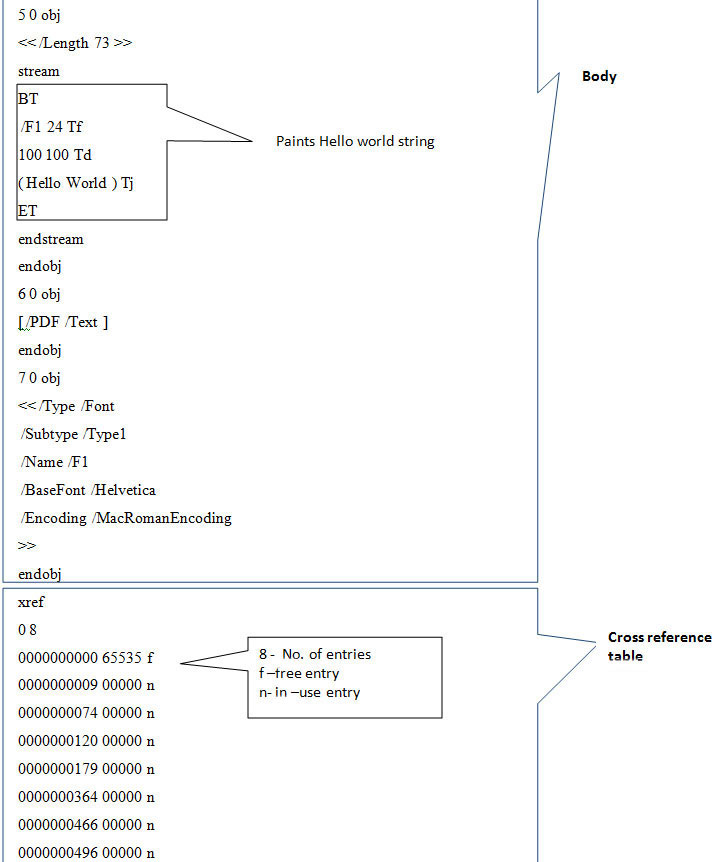
body of the file. Each cross-reference section begins with a line containing the keyword xref. Following this line are one or more cross-reference subsections, which may appear in any order. Each cross-reference subsection contains entries for a contiguous range of object numbers. The subsection begins with a line containing two numbers separated by a space: the object number of the first object in this subsection and the number of entries in the subsection. For example, the line 0 8 introduces a subsection containing five objects numbered consecutively from 0 to 8. | ||
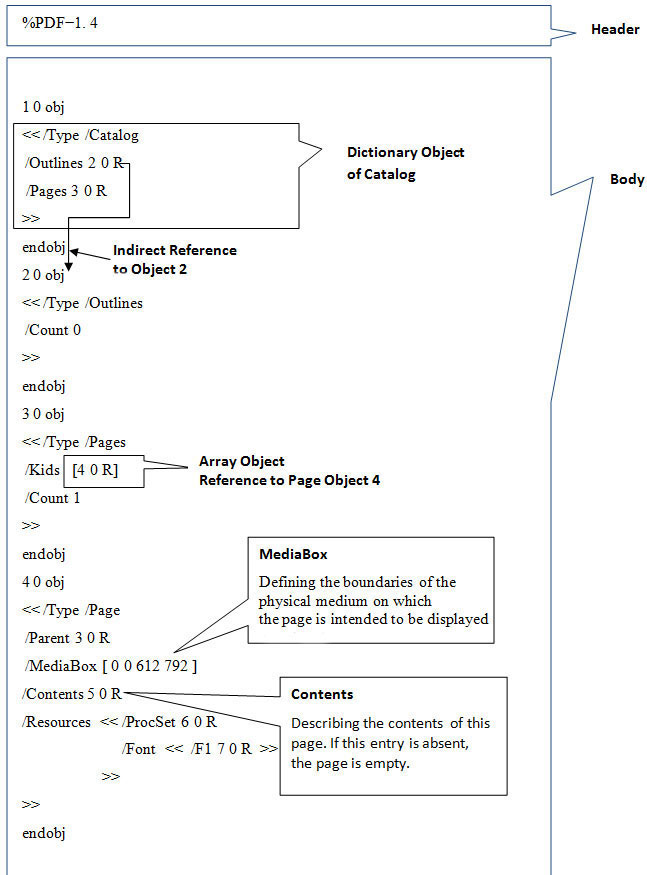
| xref 0 8 0000000000 65535 f 0000000009 00000 n 0000000074 00000 n 0000000120 00000 n 0000000179 00000 n 0000000364 00000 n 0000000466 00000 n 0000000496 00000 n | ||
| 0000000009 is 10 digit byte offset in the
case of in-use entry , giving the number of bytes from the beginning
of the file to the beginning of the object. 0000000000 is the 10-digit object number of the next free object int the case of free entry | ||
| Example Screenshots: Simple Hello World Text PDF | ||
| Here are the series of screenshots which shows different parts of sample PDF document. | ||
 | ||
 | ||
 | ||
| Reference | ||
| Conclusion | ||
| This article explains in brief internals
of PDF document, its structures, components with examples and
detailed screenshots. Hope this article will help you in the
malware research work revolviing around PDF documents. Though it is enough for beginners but advanced users are advised read through reference white paper for more granular details. |

Investigating Corrupt/Malicious PDF Document - Author: Ayush Anand
| Contents | ||
| Introduction | ||
|
||
| This article will help you get better understanding of inner working and flow of PDF file assisting you in the PDF Malware Analysis or any research work revolving around PDF. | ||
| Requirements | ||
| Before we get our hands dirty, we need to have following tools | ||
| ||
| Starting Corrupted PDF | ||
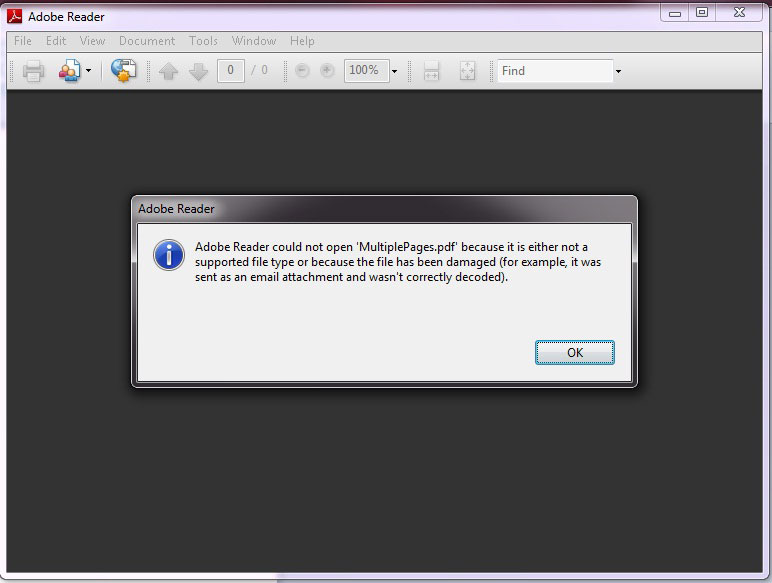
| Now download the sample document 'multipages.pdf'
[References 2] and open it in the PDF reader. On launching you will see following error |
||
 | ||
| Tracing and Fixing the Error in PDF | ||
| Lets start the investigation as to see
what went wrong with this PDF document. To get inside view, open this corrupt PDF file in Notepad++. You will see the contents as shown below | ||
|
1
0 obj
<<
/Pages
2 0
R
/Type
/Catalog
>>
endobj
2
0 obj
<<
/Count
2
/Kids
[ 3
0 R 5
0 R 7
0 R 9
0 R
11 0 R
]
/Type
/Pages
>>
endobj
3
0 obj
<<
/MediaBox
[ 0
0 795
842 ]
/Parent
2 0
R
/Contents
4 0
R
/Resources
<<
/Font
<<
/F1
<<
/Name
/F1
/BaseFont
/Helvetica
/Subtype
/Type1
/Type
/Font
>>
>>
>>
/Type
/Page
>>
endobj
4
0 obj
<<
/Length
55
>>stream
BT
/F1
18 Tf
186
690 Td
20
TL
(www.secsavvy.com)
Tj
ET
endstream
endobj
5
0 obj
<<
/MediaBox
[ 0
0 795
842 ]
/Parent
2 0
R
/Contents
6 0
R
/Resources
<<
/Font
<<
/F1
<<
/Name
/F1
/BaseFont
/Helvetica
/Subtype
/Type1
/Type
/Font
>>
>>
>>
/Type
/Page
>>
endobj
6
0 obj
<<
/Length
45
>>stream
BT
/F1
15 Tf
186
690 Td
20
TL
(Page
1) Tj
ET
endstream
endobj
7
0 obj
<<
/MediaBox
[ 0
0 795
842 ]
/Parent
2 0
R
/Contents
8 0
R
/Resources
<<
/Font
<<
/F1
<<
/Name
/F1
/BaseFont
/Helvetica
/Subtype
/Type1
/Type
/Font
>>
>>
>>
/Type
/Page
>>
endobj
8
0 obj
<<
/Length
45
>>stream
BT
/F1
15 Tf
186
690 Td
20
TL
(Page
2) Tj
ET
endstream
endobj
9
0 obj
<<
/MediaBox
[ 0
0 795
842 ]
/Parent
2 0
R
/Contents
10 0
R
/Resources
<<
/Font
<<
/F1
<<
/Name
/F1
/BaseFont
/Helvetica
/Subtype
/Type1
/Type
/Font
>>
>>
>>
/Type
/Page
>>
endobj
10
0 obj
<<
/Length
45
>>stream
BT
/F1
15 Tf
186
690 Td
20
TL
(Page
3) Tj
ET
endstream
endobj
11
0 obj
<<
/MediaBox
[ 0
0 795
842 ]
/Parent
2 0
R
/Content
12 0
R
/Resources
<<
/Font
<<
/F1
<<
/Name
/F1
/BaseFont
/Helvetica
/Subtype
/Type1
/Type
/Font
>>
>>
>>
/Type
/Page
>>
endobj
12
0 obj
<<
/Length
47
>>stream
BT
/F1
15 Tf
186
690 Td
20
TL
(Password)
Tj
ET
endstream
endobj
xref
0
13
0000000000
65535 f
0000000010
00000 n
0000000067
00000 n
0000000161
00000 n
0000000398
00000 n
0000000510
00000 n
0000000747
00000 n
0000000849
00000 n
0000001086
00000 n
0000001188
00000 n
0000001426
00000 n
0000001529
00000 n
0000001768
00000 n
trailer
<<
/Root
1 0 R
/Size
13
>>
startxref
1873
%%EOF | ||
| PDF file consists of 4 elements: | ||
| ||
| But here if you observe closely, there is no header so we will add a PDF header and try to open this PDF. | ||
| %PDF-1.7 | ||
| Lets add this missing header info at the beginning of the file. Now you can open it open it without problem as shown below. | ||
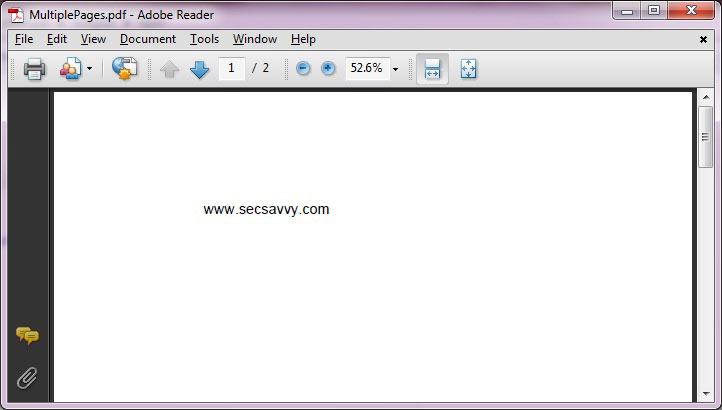 | ||
| Well that's good, but everything is not
right. From the above picture you can see that it has total of 2
pictures. Lets investigate further. Here is the screenshot showing the brief analysis of page-linking structure of this PDF file | ||
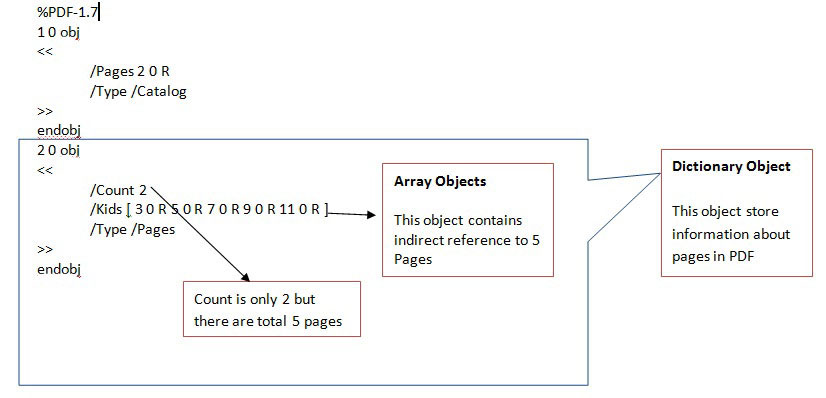 | ||
| Now, we are able to find that this PDF has actually total 5 pages so edit the Count from 2 to 5 and open this PDF as shown below. | ||
| %PDF-1.7 1 0 obj << /Pages 2 0 R /Type /Catalog >> endobj 2 0 obj << /Count 5 /Kids [ 3 0 R 5 0 R 7 0 R 9 0 R 11 0 R ] /Type /Pages >> endobj | ||
| Now, we are able to see all 5 pages but
last page is blank so we will investigate further. Last page is in fact pointed by 11 0 R indirect object reference clear from the code snippet below | ||
| 11 0 obj << /MediaBox [ 0 0 795 842 ] /Parent 2 0 R /Content 12 0 R /Resources << /Font << /F1 << /Name /F1 /BaseFont /Helvetica /Subtype /Type1 /Type /Font >> >> >> /Type /Page >> endobj | ||
| In PDF, 'Contents'
keyword is used for describing the contents of a file . If this
entry is absent then the page is empty. But here object number 12 Contents is written as 'Content' (note the missing 's' at the end). Hence the PDF reader is unable to recognize the name Content so it ignores the Content without giving any error. To fix this, simply replace Content with Contents and open the PDF. Now you will be able to see all five pages. You can download this fixed PDF 'MultiplePages_Fixed' [Reference 2] and test it for yourself. | ||
| Video Demonstration | ||
| Here is the video demonstration of this entire analysis and fixing process. | ||
|
|
||
| http://vimeo.com/18075125 | ||
| Reference | ||
| Conclusion | ||
| IHope you enjoyed this article and also
got to know more about working flow of PDF document. f you are more interested to read about PDF then I recommend you to visit excellent bog of Didier Stevens [Reference 3] |
Changing MAC Address of the Computer
| MAC Address of Computer | ||
Any packet sent to remote system on the
network contains MAC address and IP address of your computer. Many of us
are still under the
impression that IP address can be changed, but MAC address is fixed and
cannot be changed unless network card is replaced.
Though we cannot change the MAC address of the network card, we can
certainly change it in the operating system.
Here are the steps to change the MAC address on various operating systems. |
||
| Changing MAC Address on Linux | ||
On Linux platform you can just use 'ifconfig' command to set the new
MAC address as shown below.
|
||
| ||
| Changing MAC Address on Windows | ||
In windows you can use a console tool called 'etherchange' to change
the MAC address. When you run this tool, it will show you all available
network interfaces and then you can select particular interface to
change its MAC address. You can just disable and enable that network
adapter for changes to take effect. Once you have finished playing your
game, you can run this tool again to restore the MAC address back to
original.
It is basically achieved through a following registry hack. Open up your registry editor and move to the following location. |
||
| HKEY_LOCAL_MACHINE\SYSTEM\CurrentControlSet\Control\Class\ {4D36E972-E325-11CE-BFC1-08002bE10318} |
||
The above key has many subkeys with names such as 0000, 0001, 0002
etc. Each of these keys have a "DriverDesc" value on the right side
which contains the description of the network card. You have to go
through each one of these entries until you find out the one with the
same description as your current network interface. Once you have found
it,
just create following string value to set new MAC address (in
hexadecimal).
|
||
| NetworkAddress REG_SZ 111213141516 | ||
Once you have changed it, disable & re-enable the network card for
changes to take effect. Then
use the command 'ipconfig /all' to verify new MAC address. To set
that network interface
back to the original address, just delete the above value from registry.
|
||
| Now you know what can be changed and what not..! | ||
| References | ||
Bypassing Anti-virus using Code Injection Technique


Subscribe to:
Posts (Atom)