http://fumalwareanalysis.blogspot.com/
=====================================
Author: Dr. Xiang Fu
Roadmap: You need to first follow Tutorials 1 to 4 to set
up the lab configuration. Then each tutorial addresses an independent
topic and can be completed separately (each one will have its own lab
configuration instructions).
Malware Analysis Tutorial 1- A Reverse Engineering Approach (Lesson 1: VM Based Analysis Platform)
Malware Analysis Tutorial 2- Introduction to Ring3 Debugging
Malware Analysis Tutorial 3- Int 2D Anti-Debugging .
Malware Analysis Tutorial 4- Int 2D Anti-Debugging (Part II)
Malware Analysis Tutorial 5- Int 2D in Max++ (Part III) .
Malware Analysis Tutorial 6- Self-Decoding and Self-Extracting Code Segment .
Malware Analysis Tutorial 7: Exploring Kernel Data Structure .
Malware Analysis Tutorial 8: PE Header and Export Table .
Malware Analysis Tutorial 9: Encoded Export Table .
Malware Analysis Tutorial 10: Tricks for Confusing Static Analysis Tools .
Malware Analysis Tutorial 11: Starling Technique and Hijacking Kernel System Calls using Hardware Breakpoints .
Malware Analysis Tutorial 12: Debug the Debugger - Fix Module Information and UDD File .
Malware Analysis Tutorial 13: Tracing DLL Entry Point .
Malware Analysis Tutorial 14: Retrieve Self-Decoding Key .
Malware Analysis Tutorial 15: Injecting Thread into a Running Process .
Malware Analysis Tutorial 16: Return Oriented Programming (Return to LIBC) Attack .
Malware Analysis Tutorial 17: Infection of System Modules (Part I: Randomly Pick a Driver).
Malware Analysis Tutorial 18: Infecting Driver Files (Part II: Simple Infection) .
Malware Analysis Tutorial 19: Anatomy of Infected Driver
Malware Analysis Tutorial 20: Kernel Debugging - Intercepting Driver Loading .
Malware Analysis Tutorial 21: Hijacking Disk Driver
Malware Analysis Tutorial 22: IRP Handler and Infected Disk Driver
Malware Tutorial Analysis 23: Tracing Kernel Data Using Data Breakpoints
Malware Analysis Tutorial 24: Tracing Malicious TDI Network Behaviors of Max++
Malware Analysis Tutorial 25: Deferred Procedure Call (DPC) and TCP Connection
Malware Analysis Tutorial 26: Rootkit Configuration
Malware Analysis Tutorial 27: Stealthy Loading of Malicious Driver
Malware Analysis Tutorial 28: Break Max++ Rootkit Hidden Drive Protection
Malware Analysis Tutorial 29: Stealthy Library Loading II (Using Self-Modifying APC)
Malware Analysis Tutorial 30: Self-Overwriting COM Loading for Remote Loading DLL
Showing posts with label reverse engineering. Show all posts
Showing posts with label reverse engineering. Show all posts
Monday, 30 July 2012

Thursday, 8 March 2012
What is heap and stack?
The stack is a place in the computer memory where all the variables that are declared and initialized before runtime are stored. The heap is the section of computer memory where all the variables created or initialized at runtime are stored.
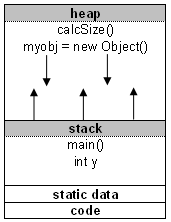 Now let's get to some details.
Data is stored in stack using the Last In First Out (LIFO) method. This means that storage in the memory is allocated and deallocated at only one end of the memory called the top of the stack. Stack is a section of memory and its associated registers that is used for temporary storage of information in which the most recently stored item is the first to be retrieved.
The stack is much faster than the heap but also smaller and more expensive.
If the main() function calls another function in the program, for example calcSize(), additional storage will be allocated for the variables in calcSize(). This storage will be allocated in the heap memory segment.
Notice that the parameters passed by main() to calcSize() are also stored on the stack. If the calcSize() function calls to any additional functions, more space would be allocated at the heap again.
When the calcSize() function returns the value, the space for its local variables at heap is then deallocated and heap clears to be available for other functions.
The memory allocated in the heap area is used and reused during program execution.
It should be noted that memory allocated in heap will contain garbage values left over from previous usage.
Memory space for objects is always allocated in heap. Objects are placed on the heap.
Built-in datatypes like int, double, float and parameters to methods are allocated on the stack.
Even though objects are held on heap, references to them are also variables and they are placed on stack.
The stack segment provides more stable storage of data for a program. The memory allocated in the stack remains in existence for the duration of a program. This is good for global and static variables. Therefore, global variables and static variables are allocated on the stack.
Note, when you do a string initialization, for example String myString;, it is a reference to an object so it will be created using new and hence it will be placed on the heap.
===========================================
What are the memory segments?
The distinction between stack and heap relates to programming. When you look at your computer memory, it is organized into three segments:- text (code) segment
- stack segment
- heap segment
What is stack?
The two sections other from the code segment in the memory are used for data. The stack is the section of memory that is allocated for automatic variables within functions.Data is stored in stack using the Last In First Out (LIFO) method. This means that storage in the memory is allocated and deallocated at only one end of the memory called the top of the stack. Stack is a section of memory and its associated registers that is used for temporary storage of information in which the most recently stored item is the first to be retrieved.
What is heap?
On the other hand, heap is an area of memory used for dynamic memory allocation. Blocks of memory are allocated and freed in this case in an arbitrary order. The pattern of allocation and size of blocks is not known until run time. Heap is usually being used by a program for many different purposes.The stack is much faster than the heap but also smaller and more expensive.
Heap and stack from programming perspective
Most object-oriented languages have some defined structure, and some come with so-called main() function. When a program begins running, the system calls the function main() which marks the entry point of the program. For example every C, C++, or C# program must have one function named main(). No other function in the program can be called main(). Before we start explaining, let's take a look at the following example:int x; /* static stack storage */
void main() {
int y; /* dynamic stack storage */
char str; /* dynamic stack storage */
str = malloc(50); /* allocates 50 bytes of dynamic heap storage */
size = calcSize(10); /* dynamic heap storage */
When a program begins executing in the main() function, all variables declared within main() will be stored on the stack.If the main() function calls another function in the program, for example calcSize(), additional storage will be allocated for the variables in calcSize(). This storage will be allocated in the heap memory segment.
Notice that the parameters passed by main() to calcSize() are also stored on the stack. If the calcSize() function calls to any additional functions, more space would be allocated at the heap again.
When the calcSize() function returns the value, the space for its local variables at heap is then deallocated and heap clears to be available for other functions.
The memory allocated in the heap area is used and reused during program execution.
It should be noted that memory allocated in heap will contain garbage values left over from previous usage.
Memory space for objects is always allocated in heap. Objects are placed on the heap.
Built-in datatypes like int, double, float and parameters to methods are allocated on the stack.
Even though objects are held on heap, references to them are also variables and they are placed on stack.
The stack segment provides more stable storage of data for a program. The memory allocated in the stack remains in existence for the duration of a program. This is good for global and static variables. Therefore, global variables and static variables are allocated on the stack.
Why is stack and heap important?
When a program is loaded into memory, it takes some memory management to organize the process. If memory management was not present in your computer memory, programs would clash with each other leaving the computer non-functional.Heap and stack in Java
When you create an object using the new operator, for example myobj = new Object();, it allocates memory for the myobj object on the heap. The stack memory space is used when you declare automatic variables.Note, when you do a string initialization, for example String myString;, it is a reference to an object so it will be created using new and hence it will be placed on the heap.
===========================================
The stack is the memory set aside as scratch
space for a thread of execution. When a function is called, a block is
reserved on the top of the stack for local variables and some
bookkeeping data. When that function returns, the block becomes unused
and can be used the next time a function is called. The stack is always
reserved in a LIFO order; the most recently reserved block is always
the next block to be freed. This makes it really simple to keep track
of the stack; freeing a block from the stack is nothing more than
adjusting one pointer.
The heap is memory set aside for dynamic allocation. Unlike the stack, there's no enforced pattern to the allocation and deallocation of blocks from the heap; you can allocate a block at any time and free it at any time. This makes it much more complex to keep track of which parts of the heap are allocated or free at any given time; there are many custom heap allocators available to tune heap performance for different usage patterns.
Stack:
Each thread gets a stack, while there's typically only one heap for the application (although it isn't uncommon to have multiple heaps for different types of allocation).
The heap is memory set aside for dynamic allocation. Unlike the stack, there's no enforced pattern to the allocation and deallocation of blocks from the heap; you can allocate a block at any time and free it at any time. This makes it much more complex to keep track of which parts of the heap are allocated or free at any given time; there are many custom heap allocators available to tune heap performance for different usage patterns.
Stack:
- Stored in computer RAM like the heap.
- Variables created on the stack will go out of scope and automatically deallocate.
- Much faster to allocate in comparison to variables on the heap.
- Implemented with an actual stack data structure.
- Stores local data, return addresses, used for parameter passing
- Can have a stack overflow when too much of the stack is used. (mostly from inifinite (or too much) recursion, very large allocations)
- Data created on the stack can be used without pointers.
- You would use the stack if you know exactly how much data you need to allocate before compile time and it is not too big.
- Usually has a maximum size already determined when your program starts
- Stored in computer RAM like the stack.
- Variables on the heap must be destroyed manually and never fall out of scope. The data is freed with delete, delete[] or free
- Slower to allocate in comparison to variables on the stack.
- Used on demand to allocate a block of data for use by the program.
- Can have fragmentation when there are a lot of allocations and deallocations
- In C++ data created on the heap will be pointed to by pointers and allocated with new or malloc
- Can have allocation failures if too big of a buffer is requested to be allocated.
- You would use the heap if you don't know exactly how much data you will need at runtime or if you need to allocate a lot of data.
- Responsible for memory leaks
Each thread gets a stack, while there's typically only one heap for the application (although it isn't uncommon to have multiple heaps for different types of allocation).
- The OS allocates the stack for each system-level thread when the thread is created. Typically the OS is called by the language runtime to allocate the heap for the application.
- The stack is attached to a thread, so when the thread exits the stack is reclaimed. The heap is typically allocated at application startup by the runtime, and is reclaimed when the application (technically process) exits.
- The size of the stack is set when a thread is created. The size of the heap is set on application startup, but can grow as space is needed (the allocator requests more memory from the operating system).
- The stack is faster because the access pattern makes it trivial to allocate and deallocate memory from it (a pointer/integer is simply incremented or decremented), while the heap has much more complex bookkeeping involved in an allocation or free. Also, each byte in the stack tends to be reused very frequently which means it tends to be mapped to the processor's cache, making it very fast.
Wednesday, 29 February 2012
Reversing Tutorial - Cracking Registration of A-One Video Converter
| Contents | ||
| Introduction | ||
|
||
| Disclaimer | ||
| This tutorial is intended for educational purposes only and the
author or the publisher or this site can not be held liable for any kind
of damages done whatsoever to your machine, or damages caused by some
other,creative application of this tutorial. In any case you disagree with the above statement, please stop here. |
||
| Requirements | ||
|
||
| Registration Step | ||
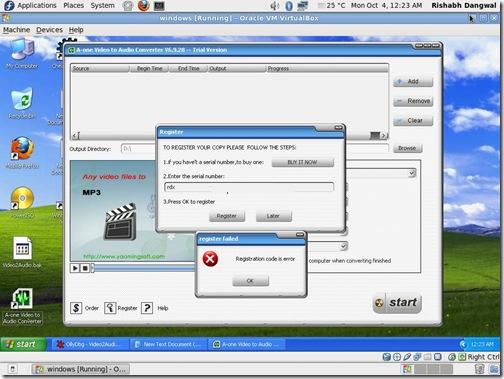
| Download & install A-one Video to Audio convertor. Now as you can see, its a trial version & once you try to register it, it gives an error <obviously>, & we need to find ways against it. | ||
 |
||
| Starting Reversing with OllyDbg | ||
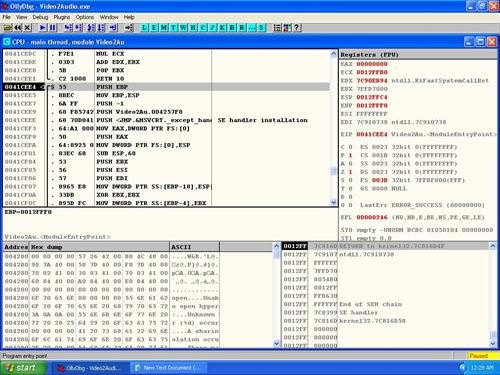
| Now, to being with, fire up OllyDBG & load the A-one Video to Audio convertor EXE file in it. | ||
 |
||
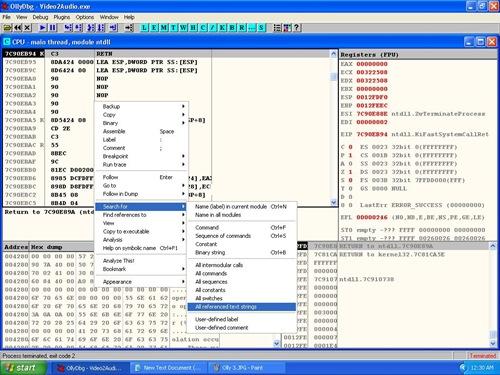
| Now in the main window of Ollydbg and search for text
"Registration code is error" [This is the exact error message
shown when you enter wrong serial number] To search you can Right click and select following action as shown in the screenshot below |
||
| CPU window -> Search for -> All Referenced Text Strings | ||
 |
||
| Once OllyDbg find it, double click on it & navigate to the memory address as shown in the screenshot below | ||
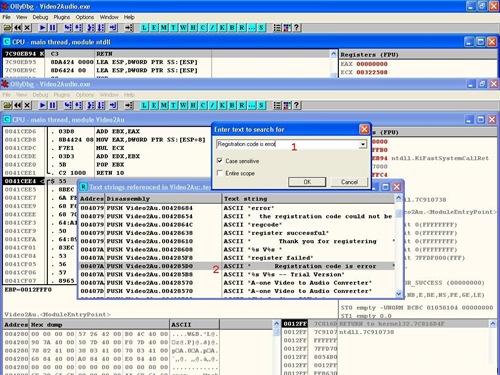 |
||
| Now, once you reach the intended memory address, you can navigate a bit up to see the "register successful" string as shown below. | ||
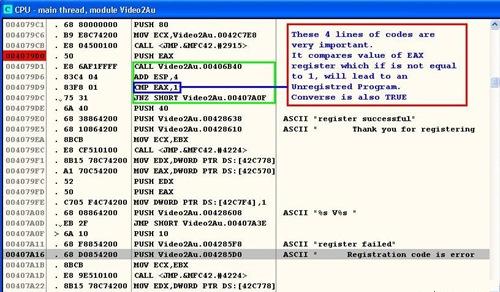 |
||
| Navigating a bit above will get a simple logic which calls a specific function & then the function returns a result which is compared with EAX register | ||
| CMP EAX,1 & then jumps to 407A0F JNZ SHORT 00407A0F |
||
| which is exactly the "registration failed" condition [refer to screenshot above]. | ||
| The whole scenario means that if value of EAX is anything less than
or grater than one, the program will be a trial version & will not
accept any invalid serial key. Now you can put a break point above the function call by pressing F2 & run the program. Then enter the serial again, the program will break here & we can then navigate inside the function by pressing F7 |
||
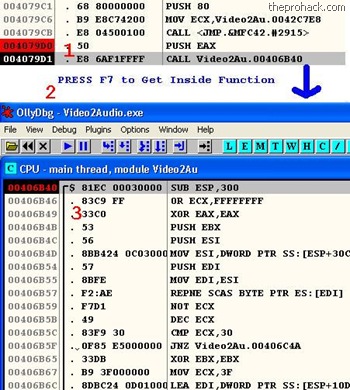 |
||
| You will get into function code. Add the breakpoint there by
pressing F2 & restart the program again by pressing Ctrl + F9 Run it again & you will find that it will break it at 00406B40 (where you had put the last breakpoint) Next we will execute code step by step by pressing F8. After bit of tracing we arrive at following instructions [refer to screenshot below] |
||
| JNZ
Video2Au.00406C4A which jumps below to POP EDI |
||
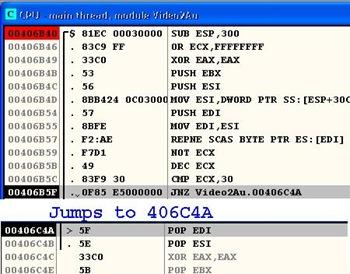 |
||
| and further down we find that the value of EAX is XORed to 0 as shown below. | ||
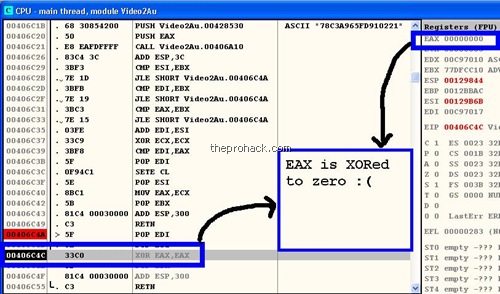 |
||
| So in order to insert a precise value into EAX, we will modify the assembly instructions as shown below [You can just double click on the instruction to modify it] | ||
| XOR EAX,EAX & changing it to MOV AL,1 |
||
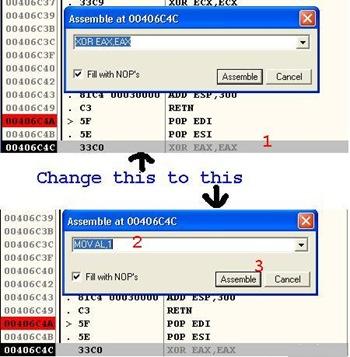 |
||
| This new instruction will set the accumulator's value to 1 because | ||
| EAX - 32 Bit reg
<extended> AX - 16 Bit reg pair AH / AL - 8 Bit regs |
||
| where AL will represent the lower value, & setting it to one will
set the accumulator to a precise value of 1, hence setting value of EAX
to 1, which will lead to program being registered :) Now once you have done it, right click the code and perform below action |
||
| copy to executable-> selection. | ||
| In the next window, right click again, save the file. | ||
 |
||
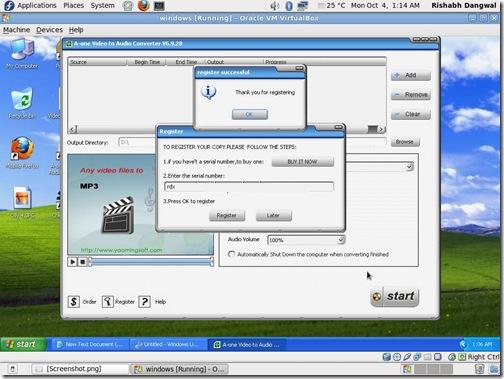
| Now that you have a cracked the registration protection of this software, launch the software and type any serial number. This should work like charm ! | ||
| Conclusion | ||
| This reversing tutorial demonstrates basic
reverse engineering concepts using OllyDbg on how to find out and
break the protection of A-One Video Converter. Hope you have enjoyed it doing as much as I did ! |
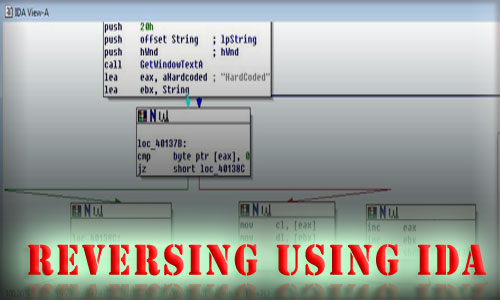
Reversing Basics - A Practical Approach Using IDA Pro - Amit Malik aka DouBle_Zer0
| Contents |
| Introduction |
| Reverse engineering is a very important skill for information security researchers. In this tutorial I will explore the basic concepts of reverse engineering by reversing a simple crackme. |
 |
| The crackme used in this tutorial is from binary auditing course. I will use static approach to solve the problem as it clearly demonstrates the power of reverse engineering. A little bit knowledge of Assembly and Disassemblers, Debuggers is required to understand this material. I will use IDA Disassembler [Reference 2] as it is the most powerful disassembler exists in the market, Hexrays provide a demo version of IDA and I think demo version is enough for solving this exercise but I am using version 5.1. |
| Reverse Engineering - Basic Steps |
| Reverse engineering can be easy and can be difficult, it depends on your target. But the basic steps are |
|
| Above steps are just basic of reverse engineering, overall process is based on reverser goals. For eg: for AV researchers and crackers basic steps are same but process is different. |
| Some Important Terms |
| API(Application Programming Interface): In windows world, code
sharing is the core of communication and trust. A user application can't
directly control hardware or can't directly communicate with windows
kernel. So how would application work if application can't talk with the
kernel ?. Windows provide various DLLs(Dynamic Link Library) and these
DLLs exports various functions to provide services to user applications
and we call them API. So the understanding of APIs is necessary. Eg: if you are using printf() function in your code and the linker links the function call to the printf() function in msvcrt.dll, so the printf() function is an API : Read PE file format if you want to know how these things work. Return Value in EAX: The second important thing is that every function/API mostly returns to EAX register. For eg: lets say we are using strlen() to calculate the length of the string, strlen() will return the value into EAX register.. |
| Reversing in Action using IDA Pro |
| Now it is time to get in action with reversing and cracking our crackme [Reference 1]. Here are our tasks, |
|
| Load file into IDA Pro. (if you don't know how to operate with IDA
then first read "THE IDA PRO BOOK" [Reference
3] excellent guide for IDA usage) Go with default options and you will see IDA is processing the file, you can start the analysis now. One of the most important thing is to look on the Import and Export function tabs to get a compact view that how many and what api is our target application using. Now run the application independently, I mean like a normal application not under debugger and feed some garbage value and note the messages that we get. |
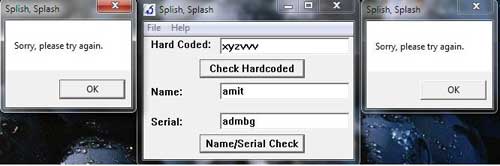 |
| As you can see in the picture that our crackme is popping up a
message box on invalid input. The String "Sorry, please try again" is
important or you can say that this string will save a lot of work,
situation may vary with target to target but for this crackme this
string can be the starting point. But as we can see that IDA is showing
the starting function and we don't have any string that can match with
the error message i.e "Sorry, Please try again". Now we have two approaches one is trace the call from start function to the function that is containing our magic string. For eg. Go into call sub_40102c and do the same within this function and another approach is to go to function tab in IDA and analyse each function independently. Generally we use the combination of both to manage the analysis time. |
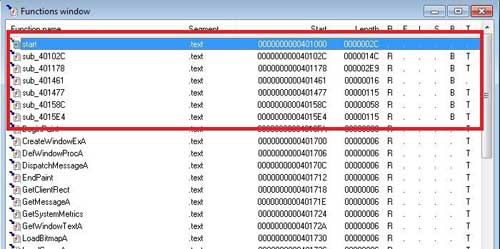 |
| As you can see in the picture that the function name starting with sub_* are user defined functions, we will open each function and look for our magic string i.e "Sorry, Please try again". Continue with this process we can find our magic string in function sub_401178. |
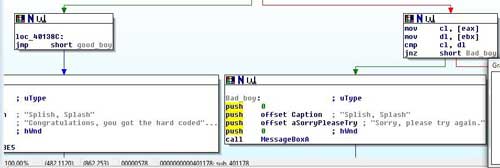 |
| As we can see in the picture that we have now clear targets, now we can backtrace and can find out the starting point of string matching. |
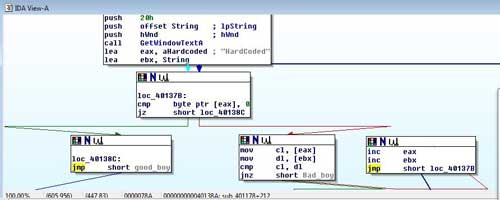 |
| In the first box we can see that application is calling a API GetWindowTextA. If you don't know the api functionality then in this case you can search on msdn win api reference guide. The guide will provide you the parameter meanings, structure and expected return values etc. |
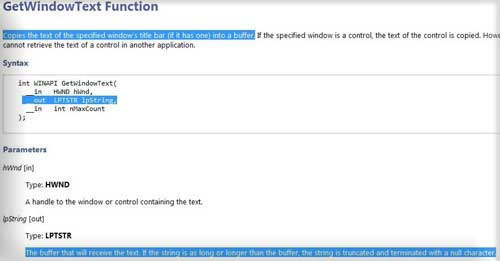 |
| Now compare this format with the format that is displayed by IDA, we can say that PUSH OFFSET String will receive the data entered by user. Now notice the next two statements LEA EAX, aHardcoded and LEA EBX, String, that means the address of a hardcoded string is moved into EAX and the address of the string that is entered by user is moved into EBX. Now we can say that the aHardcoded contain our hardcoded password because application is matching this string with the user entered string. |
| MOV CL,[EAX] ;
hardcoded string [one char each time] MOV DL,[EBX ; string entered by user [one char each time] CMP CL,DL ; compare JN Z SHORT_BAD_BOY ; if no match call bad_boy INC EAX ; else increase eax,ebx INC EBX JMP @Loop ; jump back to loop |
| The above loop is for string matching, so now we are sure that the aHardcoded contain our harcoded password and that is HardCoded. |
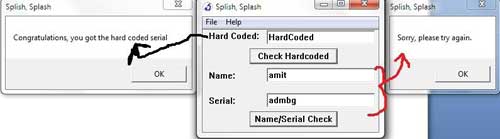 |
| Now we have to find out the solution of second challenge. But if we look into the current function we have only solution for hardcoded one so it means we have to jump to another function to find out the solution for second challenge. Continue with the same process [jumping to functions from function tab for our magic string] we can say that the function sub_4015e4 is the next target for analysis. |
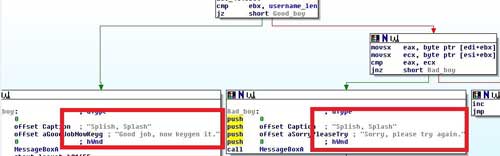 |
| Now we will backtrace to find out the origin of these message boxes
and then figure out that what value will invoke good_boy message box.
Starting point of this function is the origin of these message boxes
because at the beginning application is calling two GetWindowTextA and
we know the purpose of this API from our previous challenge. So
application is expecting Name and Serial from user. If you look at the code then we can say that if we don't fill any values into the fields then we get a message box like "Please enter username or please enter a Serial". Now what if we enter a garbage value to the fields? Then we will enter into a simple computation and we have to reverse that logic. |
| mov username_len, eax ;
move the value of eax (username length � returned by API) into a
variable xor ecx, ecx ; clear out ECX register xor ebx, ebx ; clear out EBX register xor edx, edx ; clear out EDX register lea esi, username_stor ; move the address of username (a[] = "amit" then ESI = a[0]) into ESI lea edi, user_gene ; destination buffer where we want to store username after computation (like b[] = a[0] ^ 2; it is just a example) mov ecx, 0Ah ; move the value 10 (decimal) into ecx loop: movsx eax, byte ptr [esi+ebx] ;ESI=address of username and EBX=0 -> look above cdq ;nothing special in this application used to convert dword into quadword idiv ecx ; divide the value of EAX with ECX (EAX/10 �> as ECX = 10) -> look above, now idiv instruction store the quotient into EAX and Remainder into EDX so we can say (EAX%10 = EDX) xor edx, ebx ; xor the value of EDX with EBX (notice that EBX will play as a counter)(EDX=EDX^EBX) add edx, 2 ; ADD two into EDX (EDX = EDX+2) cmp dl, 0Ah ; now compare DL (EDX) with 10 jl short loc_401646 ;if EDX < 10 jump to loc_401646 sub dl, 0Ah ; else subtract 10 from DL(EDX) loc_401646: mov [edi+ebx], dl ; move the value of DL(EDX) into EDI (EDI is our destination) -> look above inc ebx ;increment EBX (notice that EBX work as a pointer or you can say like i in a loop ?) cmp ebx, username_len ;compare the value of EBX with length of username jnz short loop_username ; jump if EBX != username_length to the (loop) -> look above |
| so now we can generate a pseudo code of these instructions let say a[] = "amit" is our source string and b[] is our destination then |
| c = 10 ; ECX i = 0 ; EBX loop: b[i] = a[i] % c; b[i] = b[i] ^ i; b[i] = b[i]+2; if (b[i] > 10) b[i] = b[i]-10; I++; If(i != strlen(a)) Goto loop; |
| So this is the logic of username computation and we have our computed value into b[]. Now comes the Serial generation algorithm. |
| xor ecx, ecx ; clear
out ECX xor ebx, ebx ; clear out EBX xor edx, edx ; clear out EDX lea esi, serial_stor ;move address of user entered serial into ESI lea edi, serial_gene ; target buffer means store serial after computation (similar to username process) mov ecx, 0Ah ; move 10 into ECX loc_401669: movsx eax, byte ptr [esi+ebx] ; move the value of serial into EAX (one char ?) cdq ; nothing special for this application idiv ecx ; divide EAX with 10; mov [edi+ebx], dl ; move the remainder into EDI (our destination) inc ebx ; increment pointer (means i) cmp ebx, serial_len ; comare it with the length of serial jnz short loc_401669 |
| Now the result of this computation is stored into another array let
say c[]; in the next few instructions we have a loop in the
application that will match the value of c[] with b[]. Notice that b[] hold the username where c[] hold the result of serial computation. As we can see in above code that application is only dividing the serial number entered by user with 10 and comparing the result with the result of username computation, so we can say that if x is the result of username computation then x * 11 is the value of serial. So now we can develop the keygen: |
| /* Author: DouBle_Zer0
*/ #include <stdio.h> #include <stdlib.h> #include <string.h> int main() { char a[10]; char b[10]; int c; int i; int d; printf("[-]Coded By DouBle_Zer0\n"); printf("Plz enter your name: "); scanf("%s",a); d = strlen(a) - 1; for(i=0;i<=d;i++) { c = a[i] % 10; c = c ^ i; c = c + 2; if (c > 10) { c = c - 10; } b[i] = c * 11; } b[i] = 0; printf("Corresponding password is: %s\n",b); system("pause"); exit(0); } |
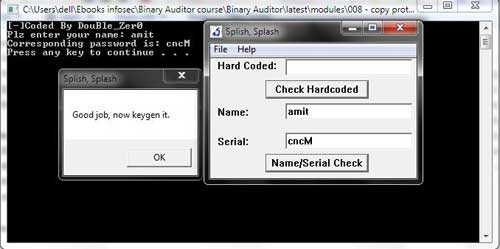
| and here is the result in front of you ! |
 |
| Video Demonstration |
| Here is the video demonstration showing the above reversing of crackme in action |
| http://vimeo.com/18821178 |
| References |
Reversing & Malware Analysis Training - Reference Guide


Assembly Programming: A Beginners Guide - Amit Malik
| Contents |
| Introduction |
|
This article is specially designed to help beginners to understand
and develop their first Assembly Program from
scratch. Through step by step instructions it will help you to use
tools, setup the environment and then build sample 'Hello
World' program in Assembly language with detailed
explaination. |
 |
|
This article is the part of our free "Reverse Engineering & Malware
Analysis Course" [Reference 4]. It is written as pre-learning guide
for our session on 'Part 4 - Assembly Programming Basics' where in
we are going to cover Assembly Programming from the reverse
engineering perspective. Here we will be demonstrating Assembly programming using MASM as it is the Microsoft assembler and provide much flexibility when it comes to development on Windows environment over various other assemblers like NASM etc. |
| Required Tools |
|
| Installation |
|
| Configuring WinAsm |
| Launch WinAsm by double clicking on the shortcut created on the desktop. In order to integrate it with MASM we need to setup the MASM path in WinAsm configurations. Here are the steps, |
|
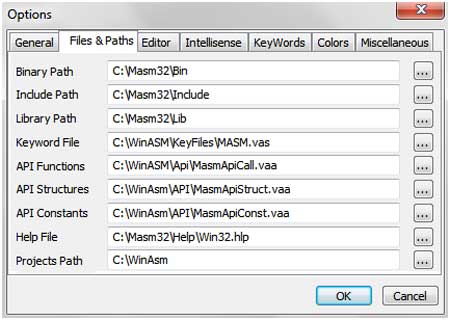 |
| After this you should be able to write programs in WinAsm. |
| Programming in ASM using MASM & WinAsm |
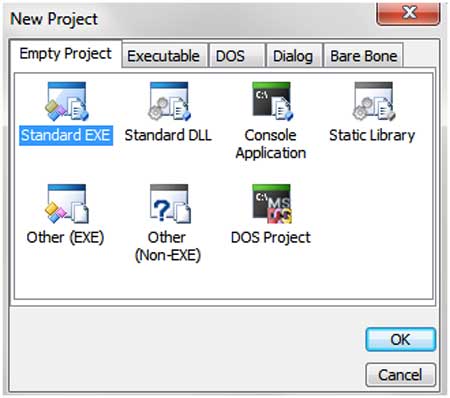
| Launch the WinAsm window, click on the "file" tab. Then click on the new projects and it will show you couple of options as shown below. |
 |
|
| Here we willl use Standard EXE because we want to make a GUI Application. Now you will see the editor window in which you can write your programs. |
| My First ASM Program |
| Here is a typical assembly program structure, |
|
| Now we will write a program that will display the message box saying "Hello World!" |
| Code: ;------------Block 1---------- .386 .model flat,stdcall option casemap:none ;------------Block 2---------- include windows.inc include user32.inc includelib user32.lib include kernel32.inc includelib kernel32.lib ;------------block 3---------- .data szCaption db "Hello",0 szMsg db "Hello World!",0 ;------------Block 4---------- .data? retvalue dd ? ;------------Block 5---------- .code start: invoke MessageBox,NULL,addr szMsg,addr szCaption,MB_OK mov retvalue,eax xor eax,eax invoke ExitProcess,eax end start |
| I divided the above code in 5 blocks. Below I will explain the purpose and functionality of each block. |
| Block 1 |
| 1).386 2).model flat,stdcall 3)option casemap:none |
| #1 - This line defines the architecture for which we want to make
this program. (.386) represent Intel architecture #2 - This line defines the model and the calling convention that we want to use for this program. We will explain it in detail in our "Assembly Basics" session. #3 - function names, variable names etc. are case sensitive |
All these three lines are required in each program. |
| Block 2 |
| 1)include windows.inc 2)include user32.inc 3)includelib user32.lib 4)include kernel32.inc 5)includelib kernel32.lib |
| include and includelib are two keywords. Include is used with .inc
files while includelib is used with .lib files. .inc files are header files. for eg: windows.inc is windows.h, you can convert any .h file into .inc file using H2INC utility that comes with MASM. .lib files are required by linker to link the used functions with the system dlls. In our program we used two .lib files (user32.lib & kernel32.lib). For each .lib file we have to include its corresponding .inc file. |
| Block 3 |
| 1).data 2)szCaption db "Hello",0 3)szMsg db "Hello World!",0 |
| .data is the section for initialized variables. Every initialized variable should be initialized in this section. In our code we have two variables of char type <string>. |
| Syntax: <variable_name> <type> <value> |
| For eg: in #2 szCaption is the variable name, db is the type means
char type, "Hello", 0 is the value. Here important point to note is that every char or string value should be terminated with zero (0). |
| Block 4 |
| 1).data? 2)retvalue dd ? |
| .data? is the section for uninitialized variables. Every uninitialized variable should be declared in this section. |
| Block 5 |
| 1).code 2)start: 3)invoke MessageBox,NULL,addr szMsg,addr szCaption,MB_OK 4)mov retvalue,eax 5)xor eax,eax 6)invoke ExitProcess,eax 7)end start |
| .code represents the start of code. All your code should be written
in this section #2 start: It is a label and it is like main function. You can name it anything but you have to use the same name in #7 otherwise linker will generate an error. For e.g.: main: ... end main #3 invoke - is the keyword, its operation is similar to "call". But in call you have to manually push parameters on the stack while invoke will do everything for you. |
| Syntax: function_name parameter1, parameter2, parameter3, etc. |
| In our code MessageBox is the API from user32.dll and it requires 4
arguments. Here important point to note is that we used "addr" with some of our variables. addr will give address of the variable instead of its value, it is like pointer in c. #7 end start - it says the end of the code and file. |
| Build and Run the Program |
| Now paste the above code in WinAsm and click
on "make" tab, in "make" click on "Assemble".
After that click on "link" which will be the executable for
this program. Finally run the EXE file by double clicking on it, it should display "Hello World!". |
| This is a basic program to help you to learn Assembly Language in most easier way. For more advanced details refer/attend our FREE Reversing/Malware Analysis course [Reference 4] |
| References |
Automation of Reversing Through Scripting -Amit Malik
| Contents |
| Introduction |
| This article teaches you how to become smart reverser by automating your reverse engineering tasks through Scripting. It is the part of our free "Reverse Engineering & Malware Analysis Course" [Reference 1]. It is primarily written to act as additional learning material for our session on 'Part 5 - Reverse Engineering Tools' where in we are going to demonstrate important reversing tools. You can visit our training page here [Reference 1] and all the presentations of previous sessions here [Reference 2] |
 |
| Reverse engineering is a sophisticated task especially when we analyse large applications or packed files like malware or normal applications for vulnerabilities.
Some of the common tasks include |
|
| These are just some simple examples where automation will help in a great way. For example, lets say that we want to monitor HeapAlloc
calls in an application and application may call HeapAlloc for hundreds
of times but we want to log the call for some specific values like if
allocation request is greater than 1024 bytes etc.
A simple script will give us all the information virtually on the
spot while in manual task we have to manually create breakpoints on
HeapAlloc and have to check if the allocation size is greater than 1024
bytes or not which eventually increase the analysis time for such a
simple task. In this article, I will show you how to automate some of these common tasks through Scripting for main reversing debuggers i.e Ollydbg, Immunity Debugger, Pydbg & Windbg with practical code samples. |
| Ollydbg - Playing with OllyScript |
| Ollydbg [Reference 3]
is one of the best ring 3 (user-land) debugger. It has a very nice gui
interface. It is one of the most popular debugger on the planet and has
very mature community support. Ollydbg is my all time favourite debugger
:) But ollydbg doesn't support scripting natively instead ollydbg support plugins. So people written scripting plugins for ollydbg, the one that i will use in this article is Ollyscript by ShaG. You can download Ollyscript from here [Reference 4]. Ollyscript comes with a nice help file. It has similar syntax like assembly programming and very easy to understand. It supports almost all functionalities like dumping memory, decision making etc. But when you compare it with other debuggers scripting environment then it will seems to be a rigid type of scripting environment, I will discuss more about it later in this article. So let's understand Ollydbg scripting environment i.e Ollyscript with the help of a simple example. |
| Problem Statement: |
| Let say we are analysing an
application for a simple bug and we want to identify the function that
is actually causing the problem. But the function is deep inside the
application and manually it will take hours of analysis time. So here we want to track the execution flow after a specific point up to the function that is causing the problem, more precisely I want to log the return address of each function. |
| Solution: |
| The above problem can be solved by multiple methods but to demonstrate it in a very simple way I will use the following steps, |
|
| Below is the tiny script to accomplish this task. Please note that the script is just to demonstrate the concept, it may fail when call used after decision instructions. :) |
| /* Author: Amit Malik http://www.securityxploded.com */ EOB breakprocess var return var infunction var x var y mov infunction,EIP mov return,EIP start: findop return,#E8# mov x,$RESULT findop infunction,#E8# mov y,$RESULT cmp x,0 ja breaksetx backx: cmp y,0 ja breaksety backy: run breakprocess: sti mov return,[esp] msg return sti mov infunction,EIP jmp start breaksetx: bp x jmp backx breaksety: bp y jmp backy |
| Please refer to the Ollyscript help file [Reference 4] for more details. Here I will explain only important keywords and terms. The script start with EOB (Execute over breakpoint), as name states it will execute the code inside the label that is specified with EOB when a breakpoint hit. In this code it will execute the breakprocess label code. |
| var - declares a variable. mov - is similar to assembly findop - search for opcode from the specified address & stores the results into a $RESULT variable run - is similar to F9 in ollydbg sti - step into - similar to F7 in ollydbg msg - will show a messagebox - (log should be used but I used msg just for visual pleasure :)) |
| As you can see that scripting is similar to assembly language. Most of the time people use ollyscripting for unpacking malwares. I have never seen anyone using it for vulnerability analysis. It is not very much flexible and also limited in its functionality. But it can be used for some stuff that we want to automate through ollydbg. |
| Immunity Debugger |
| Immunity debugger [Reference 3]
is a pure python debugger with similar GUI interface as Ollydbg. It is
developed by Immunity Inc. and according to immunity it is the only
debugger designed specifically for vulnerability research. It has some very powerful pycommands like heap, lookasidelist etc. one of the major advantage of this debugger is that it provides plethora of APIs for various reversing tasks and supports python which makes it one of the best debugger for reversing. In the reference section [Reference 6] you can find some good tutorials and projects based on Immunity debuggers and also it comes with a nice help file so don't forget to check that as well. |
| Problem statement: |
| We want to search all "jmp esp" instruction addresses. |
| Solution Script: |
| You can use the below script directly on Immunity debugger python shell |
data = "jmp esp" asm = imm.assemble(data) # imm is object of immlib class results = imm.search(asm) for addr in results: print "%s %0.8x" % (data,addr) |
| The above 5 lines of code will give you all the "jmp esp" addresses. This is the beauty of scripting :) |
| Pydbg |
| Pydbg [Reference 3] is also a pure python based debugger. Pydbg is my favourite debugger, I use it in various automation tasks and it is extremely flexible and powerful. |
| Problem Statement: |
| We want to track VirtualAlloc API whenever VirtualAlloc is called, our script should display its arguments and the returned pointer. |
| VirtualAlloc:
LPVOID WINAPI VirtualAlloc( __in_opt LPVOID lpAddress, __in SIZE_T dwSize, __in DWORD flAllocationType, __in DWORD flProtect ); |
| Solution: |
|
# Author: Amit Malik
# http://www.securityxploded.com


import sys
import pefile
import struct
from pydbg import *
from pydbg.defines import *


def ret_addr_handler(dbg):

 lpAddress = dbg.context.Eax                      # Get value returned by VirtualAlloc
 print " Returned Pointer: ",hex(int(lpAddress))

 return DBG_CONTINUE

def virtual_handler(dbg):

 print "****************"
 pdwSize = dbg.context.Esp + 8                   # 2nd argument to VirtualAlloc
 rdwSize = dbg.read_process_memory(pdwSize,4)
 dwSize  = struct.unpack("L",rdwSize)[0]
 dwSize  = int(dwSize)
 print "Allocation Size: ",hex(dwSize)

 pflAllocationType = dbg.context.Esp + 12          # 3rd argument to VirtualAlloc
 rflAllocationType = dbg.read_process_memory(pflAllocationType,4)
 flAllocationType  = struct.unpack("L",rflAllocationType)[0]
 flAllocationType  = int(flAllocationType)
 print "Allocation Type: ",hex(flAllocationType)

 pflProtect = dbg.context.Esp + 16                  # 4th Argument to VirtualAlloc
 rflProtect = dbg.read_process_memory(pflProtect,4)
 flProtect  = struct.unpack("L",rflProtect)[0]
 flProtect  = int(flProtect)
 print "Protection Type: ",hex(flProtect)

 pret_addr = dbg.context.Esp                        # Get return Address
 rret_addr = dbg.read_process_memory(pret_addr,4)
 ret_addr  = struct.unpack("L",rret_addr)[0]
 ret_addr  = int(ret_addr)
 dbg.bp_set(ret_addr,description="ret_addr breakpoint",restore = True,handler = ret_addr_handler)

 return DBG_CONTINUE

def entry_handler(dbg):

 virtual_addr = dbg.func_resolve("kernel32.dll","VirtualAlloc")   # Get VirtualAlloc address
 if virtual_addr:
  dbg.bp_set(virtual_addr,description="Virtualalloc breakpoint",restore = True,handler = virtual_handler)

 return DBG_CONTINUE

def main():

 file = sys.argv[1]
 pe = pefile.PE(file)
 # get entry point
 entry_addr = pe.OPTIONAL_HEADER.AddressOfEntryPoint + pe.OPTIONAL_HEADER.ImageBase
 dbg = pydbg()          # get pydbg object
 dbg.load(file)
 dbg.bp_set(entry_addr,description="Entry point breakpoint",restore = True,handler = entry_handler)
 dbg.run()

if __name__ == '__main__':
 main()
|
| Notice that in this script first i am setting breakpoint on
entry point and then on VirtualAlloc not directly to VirtualAlloc
because pydbg does not support deferred breakpoints. I am also ignoring
1st argument to VirtualAlloc i.e lpAddress, see VirtualAlloc
specification in problem statement. This script uses two modules PEFile and Pydbg, PEFile is used to get the entry point. |
| Windbg |
| Windbg [Reference 3]
is the official Microsoft debugger. It is the most powerful debugger
available for reversing on windows platform (mainly Kernel side of it)
and it also supports symbols. Windbg provides its own scripting language which is similar to C language, it also comes with a great help file. I highly recommend reading help file before we start with Windbg. |
| Problem Statement: |
| We want to track malloc, whenever malloc is called, our script should display requested size for allocation and returned pointer. |
| Solution: |
| On the same lines as previous example. |
|
| bp msvcrt!malloc ".printf \"Size: %x\n\",poi(esp+4);gu;.printf \"Returned Pointer: %x\n\",eax;g" |
| When we use multiple commands in a single line then we have to separate them using semicolon (;) |
| bp - sets breakpoint msvcrt!malloc - this is DLL!Method (here DLL name & function name are separated by ! ) |
| These are known as conditional breakpoints and in conditional
breakpoints we want to perform something when breakpoint hit. In our
case we want extract the size of allocation from stack. So simple syntax is: |
| bp address or dll!method or dll!method+offset "block that should be executed when breakpoint hits" poi - is similar to pointer in c gu - go up - execute until return g - go or execute |
| For more interesting commands please check out the Windbg help file. |
| Conclusion |
| This article is an additional learning material to our next session on 'Part 5 - Reverse Engineering Tools' - part of our FREE Reversing/Malware Analysis course [Reference 1] |
Monday, 27 February 2012
IDA Pro Advanced_N0w 0r N3v3r [http://kienmanowar.wordpress.com/]
IDA Pro Advanced_N0w 0r N3v3r
Author: _[kienmanowar]_
“Sóng gió cuộc đời chợt đến có ai chờ đợi.
Biết đâu một ngày phận người que diêm trước gió.
Lụi tàn trong một sớm không ngoài ai.
Nhưng với một triệu người
Hơi ấm sẻ chia từng người
Những đôi tay trần dìu nhau qua cơn khốn khó
Tầm hồn luôn rộng mở rất chân thành”
“Rock
mang đến cho tôi sự hứng khởi, lòng đam mê, tình yêu cháy bỏng, sự
cuồng nhiệt và niềm tin vào cuộc sống. Giúp tôi vững bước trước mọi khó
khăn sóng gió cuộc đời.”
I. Intro :
Chào tất cả các anh em REA, chúng ta lại gặp nhau trong phần tiếp theo tôi viết về IDA. Đây là bài viết của tác giả Medardus, có
thể coi đây như là một “đơn đặt hàng” của anh Be, và tôi là người đứng
ra nhận “bảo kê” cho “đơn đặt hàng” này. Thực tế tôi đã có ý định viết
bài này từ rất lâu nhưng… hii lại có từ nhưng, vì thời gian bận bịu quá,
sắp tới công việc lại có một số thay đổi mà chưa biết sẽ thế nào. Như
đã hứa với anh em, bài viết trước tôi đã giới thiệu sơ qua một số tính
năng của IDA, đủ để thuyết phục những người dù là khó tính nhất.Trong
bài viết này tôi sẽ ứng dụng sử dụng IDA trong quá trình Reverse một
Crackme.Hii trình độ tôi vẫn còn kém cỏi, không biết có đủ sức để hầu
chuyện anh em không nữa  . Okie, N0w L3t’s g0!!!!
. Okie, N0w L3t’s g0!!!!
II. IDA or W32Dasm…. N0w 0r N3v3r!!
Từ
những ngày đầu tiên chập chững bước vào tìm hiểu thế giới Cracking &
Reversing, những tut đầu tiên mà tôi đọc là của bậc đàn anh Ngô Vĩnh
Hoàng hay còn được biết đến với nickname là NVH(c), nhớ lại cái thủa ban
đầu ngơ ngác ấy tôi chẳng biết cái quái gì cả, chỉ biết đọc, down công
cụ và làm theo một cách hoàn toàn dập khuôn , cứ 74->75, 75->74,
không được nữa thì hehe Nop, nop, nop mà ít đầu tư vào suy nghĩ tại sao
lại như thế.Mà hầu hết các tut thời đó đều sử dụng W32Dasm, Hiew,
SoftIce v…v.. Sh1t!! nghĩ lại cái lúc hì hục cái SoftIce đến nhục, đọc
và làm theo y như hướng dẫn mà lần nào Debug không treo máy thì lại bị
Crash, hic cú quá tôi nghỉ chơi với SoftIce. Rồi sau này đọc các tut của
lão nhỏ, tham gia vào REA ngay từ những ngày đầu tiên tôi dần dần tìm
hiểu từ từ từng tí một. Các tut thời gian đó cũng hầu hết tập trung vào
SoftIce, W32Dasm nhưng có sự xuất hiện của một Tool debugger mới mà hiện
nay các bạn đang sử dụng đó, không nói chắc các bạn cũng biết đó chính
là “em” Ollydbg. Hiii sân chơi của REA lúc đó đâu có được đông như bây
giờ, chỉ có vài anh em, cầm đầu là anh Còm, anh Moon, lão Zom, bác
RongchauA, bác deux, chú Little, trong đó người có nhiều bài viết nhất
là anh Moon, khà khà tôi, anh Be, lão Q là một trong những member đầu
tiên và cũng là những người trụ lại lâu nhất trong REA. Có thể nói REA
lúc đó là một tập thể tuy chưa hiểu hết về nhau nhưng đã có cảm giác như
anh em một nhà, rất gắn bó, trao đổi thẳng thắn, giúp đỡ nhau nhiệt
tình và cho đến bây giờ vẫn vậy. Có thể tự hào mà nói rằng REA là một
trong những 4room có “chất” nhất ở Việt Nam.
Hehe
hơi lạc đề thì phải, như các bạn thấy thời đó công cụ Disassembly được
ưa chuộng nhất là W32Dasm, có thể nói nó là công cụ của mọi Newbies, đơn
giản, dễ học và dễ sử dụng. Nhưng sau này khi được tiếp xúc nhiều hơn
với Cracking & Reversing, tôi thấy có một công cụ được nhắc đến khá
nhiều đó là IDA được dùng cho cả hai giới Reversing lẫn Security.Lúc đó
tôi tự hỏi “IDA là công cụ gì mà kinh thế?” nhưng rất tiếc không có câu
trả lời. Sau này khi W32Dasm không còn được phát triển nữa, nó không đáp
ứng được những chương trình có mức độ Protect cao cũng như những chương
trình bị Packed, hic hic không còn cách nào khác tôi đành nhắm mắt đưa
chân, download em IDA về “nghịch” thử xem thế nào. Phải nói rằng cảm
giác đầu tiên khi mở IDA lên là một cảm giác choáng ngợp đến khỏ tả, vừa
khó dùng lại vừa lắm chức năng, rối rắm và phức tạp J.
IDA
là một chương trình Disassembler được phát triển bởi hãng DataRescure.
Những ai đã từng sử dụng qua W32Dasm thì chắc hẳn sẽ biết Disassembler
là như thế nào.Đối với những người chưa biềt gì thì có thể nói: Disassembler
là một chương trình, mà theo đó nhờ vào sự giúp đỡ, hỗ trợ của chương
trình này nó sẽ chuyển đổi code của một file (exe hay dll) về dạng mã
assembler, được sắp xếp lại theo một khuôn dạng dễ hiểu và dễ đọc hơn. IDA hỗ trợ đầy đủ
các tính năng có trên W32Dasm, thêm vào đó nó còn hộ trợ thêm những tính năng cao cấp khác mà W32Dasm không có, ví dụ như : FLIRT (Nearly Library Identification and Recognition Technology),
giúp đỡ cho việc nhận diện các hàm phù hợp từ các thư viện khác nhau và
hỗ trợ các chú thích cung cấp cho việc mô tả.Sẽ rất ít người trả lời
cho bạn tại sao IDA lại được sử dụng nhiều đến thế, chỉ còn mỗi một cách
là tự mình tìm hiểu và chắt lọc. Vậy còn chần chừ gì nữa mà không tìm
hiểu về IDA.
III. Play with Crackme
Oki,
tốn bao giấy mực mới đến phần quan trọng nhất của bài viết này, đó là
sử dụng IDA để thực hành với 1 Crackme.Tại sao lại là Crackme vì đơn
giản nó có kích thước nhỏ và dễ dàng trong việc
Demo
những kiến thức, thêm nữa là IDA sẽ disassembly rất nhanh còn nếu không
bạn phải chờ dài cổ khà khà. Trong bài ngày hôm nay tôi sẽ sử dụng
Crackme là CoSH Crackme #2.exe. Run thử Crackme này lên
xem thế nào, đây chính là một bước quan trọng trong quá trình Reverse,
tương tự như ta tiếp xúc với một người, ta phải quan sát thái độ, hành
vi của người đó trước để còn liệu đường mà cử xử lại cho phải phép .
. 
Download toàn bộ bài viết tại đây :
Subscribe to:
Posts (Atom)