| MAC Address of Computer | ||
Any packet sent to remote system on the
network contains MAC address and IP address of your computer. Many of us
are still under the
impression that IP address can be changed, but MAC address is fixed and
cannot be changed unless network card is replaced.
Though we cannot change the MAC address of the network card, we can
certainly change it in the operating system.
Here are the steps to change the MAC address on various operating systems. |
||
| Changing MAC Address on Linux | ||
On Linux platform you can just use 'ifconfig' command to set the new
MAC address as shown below.
|
||
| ||
| Changing MAC Address on Windows | ||
In windows you can use a console tool called 'etherchange' to change
the MAC address. When you run this tool, it will show you all available
network interfaces and then you can select particular interface to
change its MAC address. You can just disable and enable that network
adapter for changes to take effect. Once you have finished playing your
game, you can run this tool again to restore the MAC address back to
original.
It is basically achieved through a following registry hack. Open up your registry editor and move to the following location. |
||
| HKEY_LOCAL_MACHINE\SYSTEM\CurrentControlSet\Control\Class\ {4D36E972-E325-11CE-BFC1-08002bE10318} |
||
The above key has many subkeys with names such as 0000, 0001, 0002
etc. Each of these keys have a "DriverDesc" value on the right side
which contains the description of the network card. You have to go
through each one of these entries until you find out the one with the
same description as your current network interface. Once you have found
it,
just create following string value to set new MAC address (in
hexadecimal).
|
||
| NetworkAddress REG_SZ 111213141516 | ||
Once you have changed it, disable & re-enable the network card for
changes to take effect. Then
use the command 'ipconfig /all' to verify new MAC address. To set
that network interface
back to the original address, just delete the above value from registry.
|
||
| Now you know what can be changed and what not..! | ||
| References | ||
Wednesday, 29 February 2012
Changing MAC Address of the Computer

Bypassing Anti-virus using Code Injection Technique

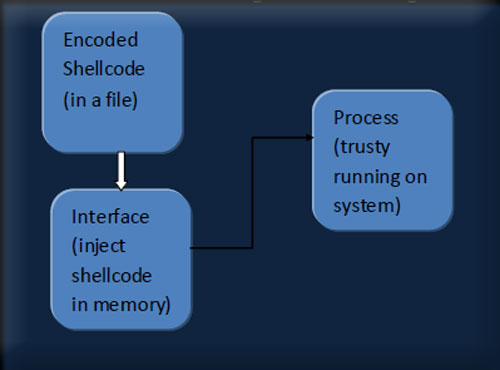
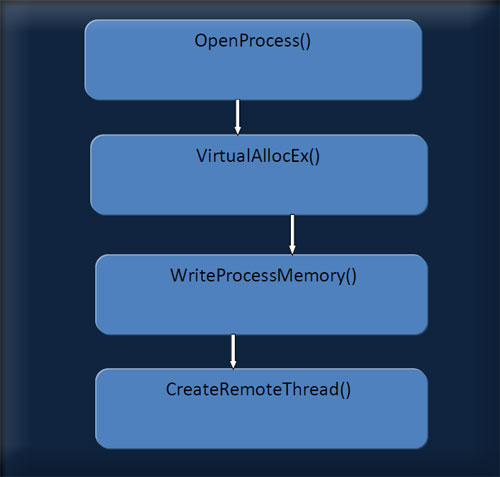
Reversing Tutorial - Cracking Registration of A-One Video Converter
| Contents | ||
| Introduction | ||
|
||
| Disclaimer | ||
| This tutorial is intended for educational purposes only and the
author or the publisher or this site can not be held liable for any kind
of damages done whatsoever to your machine, or damages caused by some
other,creative application of this tutorial. In any case you disagree with the above statement, please stop here. |
||
| Requirements | ||
|
||
| Registration Step | ||
| Download & install A-one Video to Audio convertor. Now as you can see, its a trial version & once you try to register it, it gives an error <obviously>, & we need to find ways against it. | ||
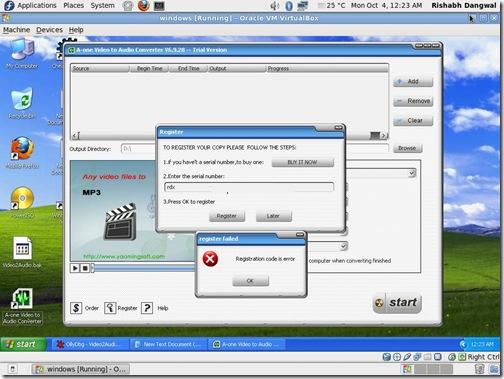 |
||
| Starting Reversing with OllyDbg | ||
| Now, to being with, fire up OllyDBG & load the A-one Video to Audio convertor EXE file in it. | ||
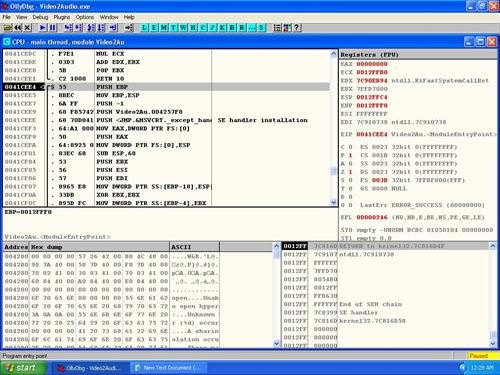 |
||
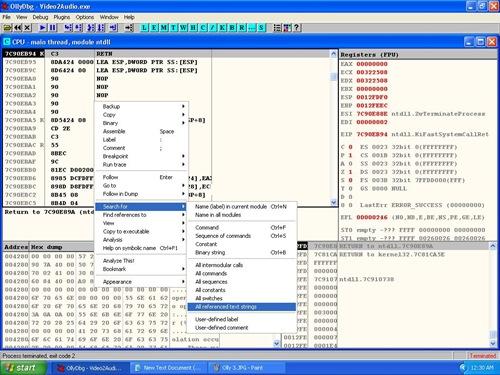
| Now in the main window of Ollydbg and search for text
"Registration code is error" [This is the exact error message
shown when you enter wrong serial number] To search you can Right click and select following action as shown in the screenshot below |
||
| CPU window -> Search for -> All Referenced Text Strings | ||
 |
||
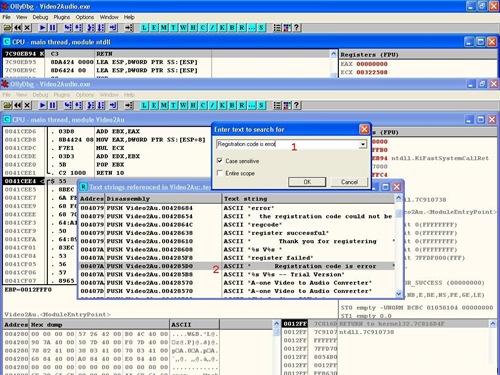
| Once OllyDbg find it, double click on it & navigate to the memory address as shown in the screenshot below | ||
 |
||
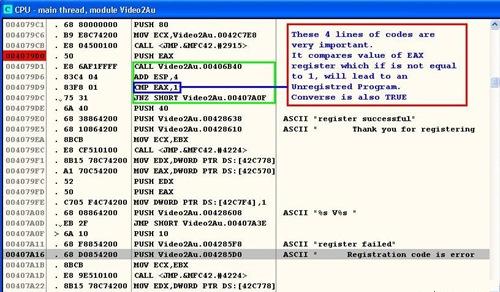
| Now, once you reach the intended memory address, you can navigate a bit up to see the "register successful" string as shown below. | ||
 |
||
| Navigating a bit above will get a simple logic which calls a specific function & then the function returns a result which is compared with EAX register | ||
| CMP EAX,1 & then jumps to 407A0F JNZ SHORT 00407A0F |
||
| which is exactly the "registration failed" condition [refer to screenshot above]. | ||
| The whole scenario means that if value of EAX is anything less than
or grater than one, the program will be a trial version & will not
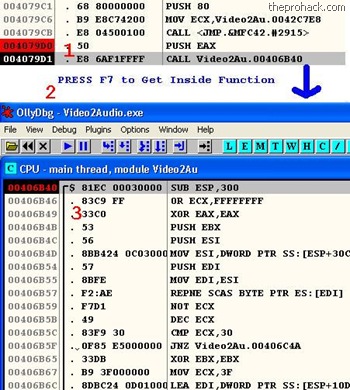
accept any invalid serial key. Now you can put a break point above the function call by pressing F2 & run the program. Then enter the serial again, the program will break here & we can then navigate inside the function by pressing F7 |
||
 |
||
| You will get into function code. Add the breakpoint there by
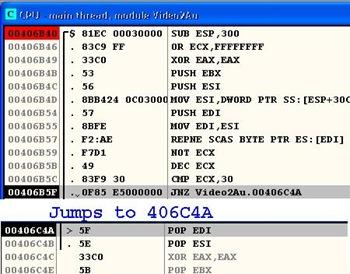
pressing F2 & restart the program again by pressing Ctrl + F9 Run it again & you will find that it will break it at 00406B40 (where you had put the last breakpoint) Next we will execute code step by step by pressing F8. After bit of tracing we arrive at following instructions [refer to screenshot below] |
||
| JNZ
Video2Au.00406C4A which jumps below to POP EDI |
||
 |
||
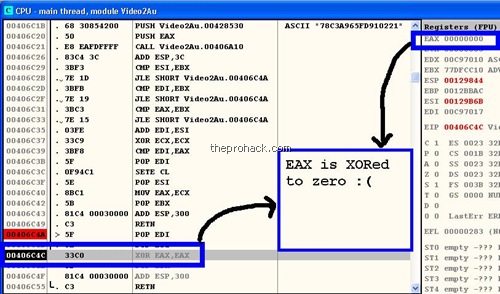
| and further down we find that the value of EAX is XORed to 0 as shown below. | ||
 |
||
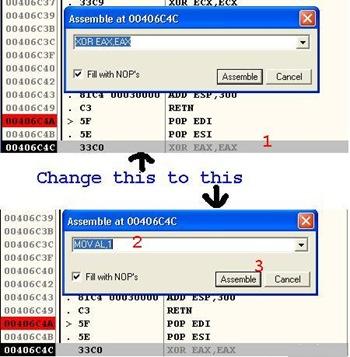
| So in order to insert a precise value into EAX, we will modify the assembly instructions as shown below [You can just double click on the instruction to modify it] | ||
| XOR EAX,EAX & changing it to MOV AL,1 |
||
 |
||
| This new instruction will set the accumulator's value to 1 because | ||
| EAX - 32 Bit reg
<extended> AX - 16 Bit reg pair AH / AL - 8 Bit regs |
||
| where AL will represent the lower value, & setting it to one will
set the accumulator to a precise value of 1, hence setting value of EAX
to 1, which will lead to program being registered :) Now once you have done it, right click the code and perform below action |
||
| copy to executable-> selection. | ||
| In the next window, right click again, save the file. | ||
 |
||
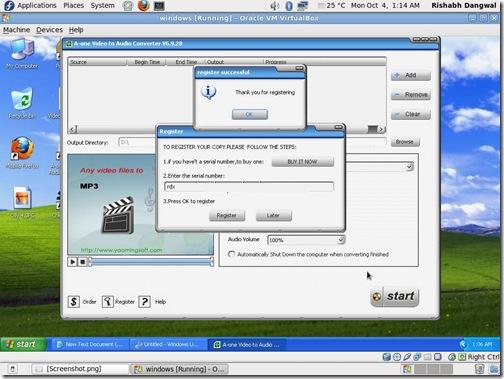
| Now that you have a cracked the registration protection of this software, launch the software and type any serial number. This should work like charm ! | ||
| Conclusion | ||
| This reversing tutorial demonstrates basic
reverse engineering concepts using OllyDbg on how to find out and
break the protection of A-One Video Converter. Hope you have enjoyed it doing as much as I did ! |

Reversing Basics - A Practical Approach Using IDA Pro - Amit Malik aka DouBle_Zer0
| Contents |
| Introduction |
| Reverse engineering is a very important skill for information security researchers. In this tutorial I will explore the basic concepts of reverse engineering by reversing a simple crackme. |
 |
| The crackme used in this tutorial is from binary auditing course. I will use static approach to solve the problem as it clearly demonstrates the power of reverse engineering. A little bit knowledge of Assembly and Disassemblers, Debuggers is required to understand this material. I will use IDA Disassembler [Reference 2] as it is the most powerful disassembler exists in the market, Hexrays provide a demo version of IDA and I think demo version is enough for solving this exercise but I am using version 5.1. |
| Reverse Engineering - Basic Steps |
| Reverse engineering can be easy and can be difficult, it depends on your target. But the basic steps are |
|
| Above steps are just basic of reverse engineering, overall process is based on reverser goals. For eg: for AV researchers and crackers basic steps are same but process is different. |
| Some Important Terms |
| API(Application Programming Interface): In windows world, code
sharing is the core of communication and trust. A user application can't
directly control hardware or can't directly communicate with windows
kernel. So how would application work if application can't talk with the
kernel ?. Windows provide various DLLs(Dynamic Link Library) and these
DLLs exports various functions to provide services to user applications
and we call them API. So the understanding of APIs is necessary. Eg: if you are using printf() function in your code and the linker links the function call to the printf() function in msvcrt.dll, so the printf() function is an API : Read PE file format if you want to know how these things work. Return Value in EAX: The second important thing is that every function/API mostly returns to EAX register. For eg: lets say we are using strlen() to calculate the length of the string, strlen() will return the value into EAX register.. |
| Reversing in Action using IDA Pro |
| Now it is time to get in action with reversing and cracking our crackme [Reference 1]. Here are our tasks, |
|
| Load file into IDA Pro. (if you don't know how to operate with IDA
then first read "THE IDA PRO BOOK" [Reference
3] excellent guide for IDA usage) Go with default options and you will see IDA is processing the file, you can start the analysis now. One of the most important thing is to look on the Import and Export function tabs to get a compact view that how many and what api is our target application using. Now run the application independently, I mean like a normal application not under debugger and feed some garbage value and note the messages that we get. |
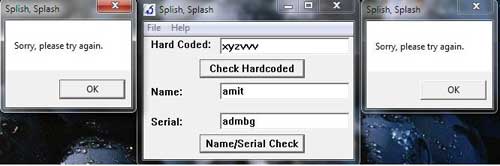 |
| As you can see in the picture that our crackme is popping up a
message box on invalid input. The String "Sorry, please try again" is
important or you can say that this string will save a lot of work,
situation may vary with target to target but for this crackme this
string can be the starting point. But as we can see that IDA is showing
the starting function and we don't have any string that can match with
the error message i.e "Sorry, Please try again". Now we have two approaches one is trace the call from start function to the function that is containing our magic string. For eg. Go into call sub_40102c and do the same within this function and another approach is to go to function tab in IDA and analyse each function independently. Generally we use the combination of both to manage the analysis time. |
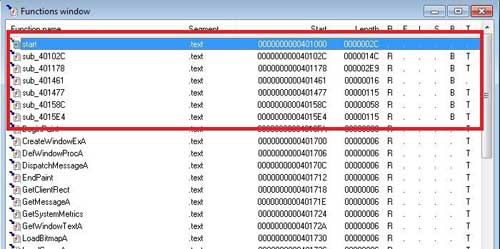 |
| As you can see in the picture that the function name starting with sub_* are user defined functions, we will open each function and look for our magic string i.e "Sorry, Please try again". Continue with this process we can find our magic string in function sub_401178. |
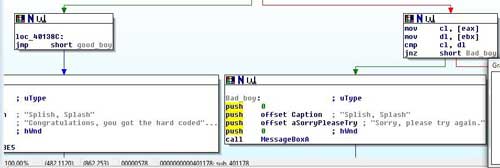 |
| As we can see in the picture that we have now clear targets, now we can backtrace and can find out the starting point of string matching. |
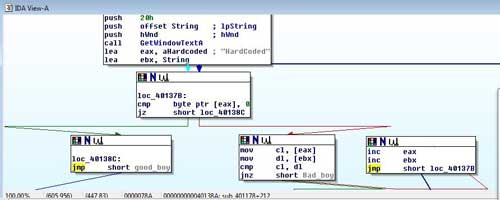 |
| In the first box we can see that application is calling a API GetWindowTextA. If you don't know the api functionality then in this case you can search on msdn win api reference guide. The guide will provide you the parameter meanings, structure and expected return values etc. |
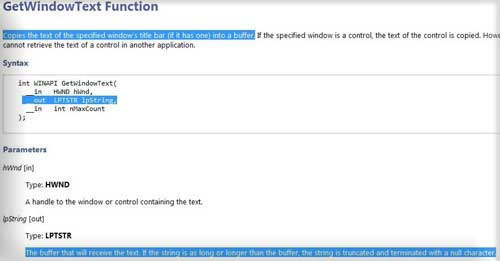 |
| Now compare this format with the format that is displayed by IDA, we can say that PUSH OFFSET String will receive the data entered by user. Now notice the next two statements LEA EAX, aHardcoded and LEA EBX, String, that means the address of a hardcoded string is moved into EAX and the address of the string that is entered by user is moved into EBX. Now we can say that the aHardcoded contain our hardcoded password because application is matching this string with the user entered string. |
| MOV CL,[EAX] ;
hardcoded string [one char each time] MOV DL,[EBX ; string entered by user [one char each time] CMP CL,DL ; compare JN Z SHORT_BAD_BOY ; if no match call bad_boy INC EAX ; else increase eax,ebx INC EBX JMP @Loop ; jump back to loop |
| The above loop is for string matching, so now we are sure that the aHardcoded contain our harcoded password and that is HardCoded. |
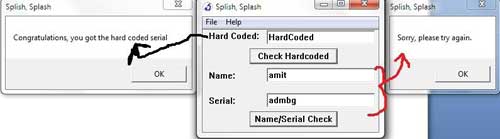 |
| Now we have to find out the solution of second challenge. But if we look into the current function we have only solution for hardcoded one so it means we have to jump to another function to find out the solution for second challenge. Continue with the same process [jumping to functions from function tab for our magic string] we can say that the function sub_4015e4 is the next target for analysis. |
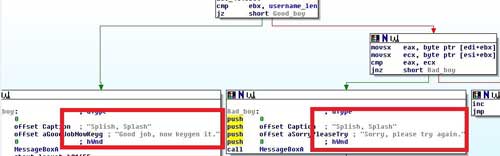 |
| Now we will backtrace to find out the origin of these message boxes
and then figure out that what value will invoke good_boy message box.
Starting point of this function is the origin of these message boxes
because at the beginning application is calling two GetWindowTextA and
we know the purpose of this API from our previous challenge. So
application is expecting Name and Serial from user. If you look at the code then we can say that if we don't fill any values into the fields then we get a message box like "Please enter username or please enter a Serial". Now what if we enter a garbage value to the fields? Then we will enter into a simple computation and we have to reverse that logic. |
| mov username_len, eax ;
move the value of eax (username length � returned by API) into a
variable xor ecx, ecx ; clear out ECX register xor ebx, ebx ; clear out EBX register xor edx, edx ; clear out EDX register lea esi, username_stor ; move the address of username (a[] = "amit" then ESI = a[0]) into ESI lea edi, user_gene ; destination buffer where we want to store username after computation (like b[] = a[0] ^ 2; it is just a example) mov ecx, 0Ah ; move the value 10 (decimal) into ecx loop: movsx eax, byte ptr [esi+ebx] ;ESI=address of username and EBX=0 -> look above cdq ;nothing special in this application used to convert dword into quadword idiv ecx ; divide the value of EAX with ECX (EAX/10 �> as ECX = 10) -> look above, now idiv instruction store the quotient into EAX and Remainder into EDX so we can say (EAX%10 = EDX) xor edx, ebx ; xor the value of EDX with EBX (notice that EBX will play as a counter)(EDX=EDX^EBX) add edx, 2 ; ADD two into EDX (EDX = EDX+2) cmp dl, 0Ah ; now compare DL (EDX) with 10 jl short loc_401646 ;if EDX < 10 jump to loc_401646 sub dl, 0Ah ; else subtract 10 from DL(EDX) loc_401646: mov [edi+ebx], dl ; move the value of DL(EDX) into EDI (EDI is our destination) -> look above inc ebx ;increment EBX (notice that EBX work as a pointer or you can say like i in a loop ?) cmp ebx, username_len ;compare the value of EBX with length of username jnz short loop_username ; jump if EBX != username_length to the (loop) -> look above |
| so now we can generate a pseudo code of these instructions let say a[] = "amit" is our source string and b[] is our destination then |
| c = 10 ; ECX i = 0 ; EBX loop: b[i] = a[i] % c; b[i] = b[i] ^ i; b[i] = b[i]+2; if (b[i] > 10) b[i] = b[i]-10; I++; If(i != strlen(a)) Goto loop; |
| So this is the logic of username computation and we have our computed value into b[]. Now comes the Serial generation algorithm. |
| xor ecx, ecx ; clear
out ECX xor ebx, ebx ; clear out EBX xor edx, edx ; clear out EDX lea esi, serial_stor ;move address of user entered serial into ESI lea edi, serial_gene ; target buffer means store serial after computation (similar to username process) mov ecx, 0Ah ; move 10 into ECX loc_401669: movsx eax, byte ptr [esi+ebx] ; move the value of serial into EAX (one char ?) cdq ; nothing special for this application idiv ecx ; divide EAX with 10; mov [edi+ebx], dl ; move the remainder into EDI (our destination) inc ebx ; increment pointer (means i) cmp ebx, serial_len ; comare it with the length of serial jnz short loc_401669 |
| Now the result of this computation is stored into another array let
say c[]; in the next few instructions we have a loop in the
application that will match the value of c[] with b[]. Notice that b[] hold the username where c[] hold the result of serial computation. As we can see in above code that application is only dividing the serial number entered by user with 10 and comparing the result with the result of username computation, so we can say that if x is the result of username computation then x * 11 is the value of serial. So now we can develop the keygen: |
| /* Author: DouBle_Zer0
*/ #include <stdio.h> #include <stdlib.h> #include <string.h> int main() { char a[10]; char b[10]; int c; int i; int d; printf("[-]Coded By DouBle_Zer0\n"); printf("Plz enter your name: "); scanf("%s",a); d = strlen(a) - 1; for(i=0;i<=d;i++) { c = a[i] % 10; c = c ^ i; c = c + 2; if (c > 10) { c = c - 10; } b[i] = c * 11; } b[i] = 0; printf("Corresponding password is: %s\n",b); system("pause"); exit(0); } |
| and here is the result in front of you ! |
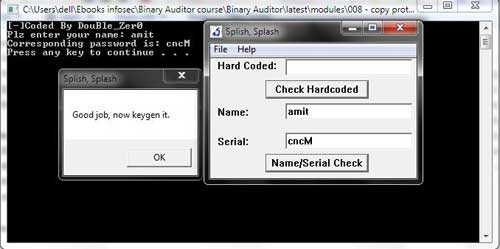 |
| Video Demonstration |
| Here is the video demonstration showing the above reversing of crackme in action |
| http://vimeo.com/18821178 |
| References |
Reversing & Malware Analysis Training - Reference Guide


Recover Windows Passwords Using Rainbow Crack
| About Rainbow Crack |
Gone are the days when we have to wait for the days together to
recover the Windows account password. Thanks to the
rainbow crack
technology, now we can crack the passwords in few seconds
with 100% success rate.
This Rainbow cracking technology works on simple concept. Instead of computing the hashes for each password dynamically and comparing with the correct one during cracking, password hashes are computed in advance for all character sets. These hashes are then stored in datasets called rainbow tables. So cracking involves just comparing the current password hash with the pre computed hashes within the rainbow tables and get the associated plain text password. Hence it takes very less time compared to the traditional method of brute force cracking. Setting up the rainbow table for various character sets is just one time activity and may take days or months based on the character set and speed of the machine. Once the rainbow tables are ready, you can feed the password hash to it and get your password cracked in seconds. |
 |
| Recovering Windows Account Password |
In order to recover your Windows user password,
first you have to get the
LM hash for the target user account. This can be done in many ways. You can
use any of the tools such as
pwdump,
cain&abel or
LC5. You
need to have administrator privileges to dump the hashes using these
tools. If you
have lost administrator password itself, then you can boot the
system using
BackTrack live cd or Windows restore CD and then copy the SAM &
SYSTEM hive files (which is located in c:\windows\system32\config
folder. Note that your system drive may be different). Next feed these
files to Cain
& Abel tool to get the LM hashes for the target account.
|
| Here is the screenshot of retrieving LM hash for users using the Cain&Abel tool |
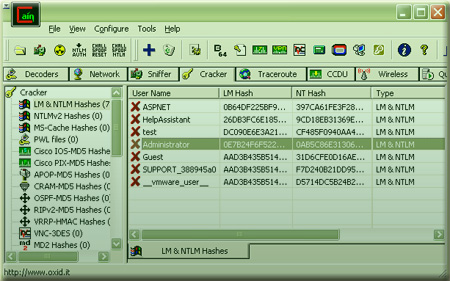 |
Once you have collected the LM
password hash, you can start the password cracking operation using
the rcrack tool (part of the
RainbowCrack Project)
with the rainbow tables that you have already created for certain
character sets.
|
| Note that with Vista onwards Windows no longer stores LM hashes (unless under certain configurations) as it was susceptible to easy brute force cracking. In such cases, you can as well use the NTLM hash to recover password with RainbowCrack. |
| Ideally setting up the rainbow tables takes huge amount of disk space and lot of computing time to generate the tables. Hence its not practical for anyone to create such an setup on the home system. |
| Online Rainbow Cracking |
| To make the game eaiser, lot of websites ( including free as
well as commericial ) offer free online rainbow cracking service. These
organizations have setup huge database of rainbow tables for all keysets
on their high end machines which makes the cracking possible in few
seconds. Also these services offer password cracking for different type
of hashes such as LM, NTLM, SHA, MD5 etc. For FREE services you may have to wait for some time based on the load and incoming requests. However you may also look for commercial services for quick results at smaller cost. If you are an organization who needs this kind of password recovery service frequently then you can consider buying precomputed rainbow tables for reasonable price and perform the password cracking operation using rcrack tool. |
Here are the list of websites which offer
FREE online rainbow
cracking.
|
| If you find good online hash cracker links let us know, we will update it here. |
| Now you don't have to wait for days together with half hope to get back your lost password :) |
Hidden Registry Detection
| Contents | ||||||||||||||||
| Introduction to Registry | ||||||||||||||||
Registry is the large database where Windows stores all the
system, security and software specific settings. It is a tree like
structure, which can be viewed or modified using the standard
windows utilities such as Regedit.exe (start->run->
regedit) .
|
||||||||||||||||
In addition to all system settings, Registry also contains
various startup entries for processes and services that are
automatically started
when Windows starts. For example, all Windows services are stored
under the following Registry key,
| ||||||||||||||||
| 'HKEY_LOCAL_MACHINE\SYSTEM\CurrentControlSet\Services'. | ||||||||||||||||
| Similarly some of the startup process entries can be found in the following Registry locations, | ||||||||||||||||
| HKEY_LOCAL_MACHINE\SOFTWARE\Microsoft\Windows\CurrentVersion\Run,
HKEY_LOCAL_MACHINE\SOFTWARE\Microsoft\Windows\CurrentVersion\policies\explorer\Run | ||||||||||||||||
| Rootkit & Reason to Hide Registry | ||||||||||||||||
| Rootkits generally modifies these entry points to start their own processes, services or drivers. So it's important for the Rootkit to hide these registry entries to prevent its detection from various system-monitoring tools such as Autoruns, HijackThis, etc. | ||||||||||||||||
|
Rootkits use various methods to hide their registry infiltration.
One of the most commonly used techniques is hooking the registry API
functions such as RegOpenKey, RegEnumKey, RegEnumValue etc. All of these
top level API functions in turn will call low level NT functions such as
NTOpenKey, NtEnumerateKey and NtEnumerateValueKey etc. So in order
to be more effective, Rootkits typically hook NT version of these
functions. As a result whenever any application calls these registry functions, Hooked Rootkit function will return the filtered results there by hiding its presence. |
||||||||||||||||
| Art of Detecting Hidden Registry Keys | ||||||||||||||||
|
Most common detection mechanism used in these cases is the cross-view
comparison method. In this method initially, high level registry API
functions (such as RegEnumKey, RegEnumValue) are used to enumerate the
keys and values. Next some of the advanced techniques are used to enumerate
the same
registry keys. Then the both results are compared to find out the
hidden Rootkit entries.
Many such lower level techniques are present to detect hidden registry keys. Here we will discuss about two such prominent methods in detail. |
||||||||||||||||
| Hidden Registry Detection using Direct NT System Call Method | ||||||||||||||||
|
As mentioned previously, Rootkits hide their registry entries by
hooking the lower level NT functions. In order to effectively detect
these entries, one can directly invoke those NT functions rather than
using API functions. Every NT function in Windows is uniquely identified
through its service number (For NtEnumerateKey its 0x47). So instead of
calling these NT functions, one can directly call these functions by
using INT 2E (for Windows 2K) or Sysenter (Windows XP onwards)
instruction by passing the respective service number. Here is the direct implementation of NtEnumerateKey and NtEnumerateValueKey function, which can be directly called to bypass any API level hooks put by the Rootkits. |
||||||||||||||||
//For Windows XP, for other platforms only service number will differ _declspec(naked)
NTSTATUS __stdcall DirectNtEnumerateKey(
IN HANDLE KeyHandle,
IN ULONG Index,
IN KEY_INFORMATION_CLASS KeyInformationClass,
OUT PVOID KeyInformation,
IN ULONG KeyInformationLength,
OUT PULONG ResultLength )
{
__asm
{
mov eax, 0x47
call DirectCall_XP
ret 0x18
DirectCall_XP:
mov edx, esp
sysenter
}
}
//For Windows XP, for other platforms only service number will differ _declspec(naked)
NTSTATUS __stdcall DirectNtEnumerateValueKey(
IN HANDLE KeyHandle,
IN ULONG Index,
IN KEY_VALUE_INFORMATION_CLASS KeyValueInformationClass,
OUT PVOID KeyValueInformation,
IN ULONG KeyValueInformationLength,
OUT PULONG ResultLength )
{
__asm
{
mov eax, 0x49
call DirectCall_XP
ret 0x18
DirectCall_XP:
mov edx, esp
sysenter
}
}
|
||||||||||||||||
|
Rootkits may also hook the NtOpenKey function to prevent any hidden
key from being opened. So it will become useless even if one is able to
discover the key name. In such case, one can use direct NtOpenKey
function as shown below... |
||||||||||||||||
//Note that this code is written for Windows XP. For other platforms
only service number will differ _declspec(naked)
NTSTATUS __stdcall DirectNtOpenKey(
OUT PHANDLE KeyHandle,
IN ACCESS_MASK DesiredAccess,
IN POBJECT_ATTRIBUTES ObjectAttributes )
{
__asm
{
mov eax, 0x77
call DirectCall_XP
ret 0x0C
DirectCall_XP:
mov edx, esp
sysenter
}
}
|
||||||||||||||||
| Though Rootkits can bypass this technique by hooking the above-mentioned NT functions in the kernel, it presents simple but very effective mechanism to detect any hidden Rootkit registry entries in user land. | ||||||||||||||||
| Hidden Registry Detection by Directly Reading Registry Hives | ||||||||||||||||
| Windows stores the entire registry contents into the different files called Hives in a standard format. A different portion of registry is stored in respective hive files such as SYSTEM, SOFTWARE, SECURITY, SAM, etc. in the 'C:\Windows\System32\Config' folder. Here is the table showing the mapping between the registry section and corresponding registry hive file. | ||||||||||||||||
|
||||||||||||||||
|
Though the internal format of
these registry hive file is undocumented, lot of code samples and good
amount of documentation can be found on the net.These hive files are
generally locked while Windows is running and hence remains
inaccessible. However if you like to understand internal storage
structure of these hive files, you can use the API function such as
RegSaveKey (or equivalent
NT function NtSaveKey) to save any registry section to
the chosen file. Then you can manually traverse through this hive file
to decipher the low level of registry entries. Detailed code sample to traverse the hive file can be found in the article [1] 'How to avoid the detection of hidden regkey by hooking RegSaveKeyA' written by EiNSTeiN_. Also the whitepaper [2] 'Detection of Rootkits in Windows registry' by miel-labs explains in detail the complete structure of registry hive file. In this detection method, all registry entries are retrieved by traversing through these hive files. Then this list is compared against the high level list obtained through normal registry API functions such as RegEnumKey, RegEnumValue etc. At the end any additional entries discovered will be marked as Hidden Rootkit registry entries. Though this method involves using undocumented registry hive traversal method, it is very effective method in detecting the registry entries hidden through even the Kernel level hooks (such as SSDT hooks). |
||||||||||||||||
| Conclusion | ||||||||||||||||
| This article shows why Rootkits hide their registry entries and some of the methods which can be used to detect such hidden entries to reveal the traces of Rootkits. Though some of these techniques can be bypassed by Rootkits operating in Kernel land, these methods present very simple and powerful methods to detect any registry entries hidden by userland Rootkits. | ||||||||||||||||
| References | ||||||||||||||||
| 1.
How to avoid the detection of hidden regkey by hooking RegSaveKeyA 2. Detection of Rootkits in Windows registry 3. How to become unseen on Windows NT by HxDef |
Hidden Rootkit Services Detection
| Contents |
| Introduction to Windows Services |
Windows Service is a program executing in the background which is
started automatically when Windows boots and runs as long as System
is up and running. Service is designed to perform a specific
function and generally does not interact with user.Compared to
normal processes, Services normally run with
'System' privilege
which allow them to perform higher privilege operations. Windows
Service Manager (Services.exe) is responsible for managing all
aspects of Services. Services can be managed using the built in
'Service Management Console' which can be launched through
'Administrative Tools' in Control Panel.
As services runs with highest privilege, most Rootkits implement services to keep control over the entire system.Though services operate in the background they can be seen through the 'Task Manager' or 'Service Management Console'. So it is important for the Rootkits to hide their services to prevent its detection. |
| How Rootkits Hide Services |
|
Many Rootkits such as Hacker Defender, Vanquish use the Services not
only to manage its operations but to remain under the cover. As services
are visible to normal user, Rootkits use multiple techniques to hide
their services.
One of the common way to list windows services is using EnumServicesStatus API function. So Rootkits generally hook this function and return the results by filtering out its services. As a result any Anti-Rootkit application which uses this method will fail to discover such Rootkit services. Another way to list all services is by enumerating 'Services' registry key. Windows keeps the database of all installed services in the registry at following location . |
| 'HKEY_LOCAL_MACHINE\System\CurrentControlSet\Services' |
|
So application can manually enumerate through all the entries within
this registry key to discover all the services. To hide from this
technique, Rootkits hook the registry enumeration API functions and
return the modified values thus deceiving the detection tools. Detailed information about hiding registry entries and their detection is mentioned in the article [1]"Hidden Registry Detection". |
| Hidden Rootkit Services Detection Methods |
| As mentioned above, Rootkits use advanced techniques to hide their services from being detected by various Applications. Here are some of the methods which can be effectively used to detect most of such Rootkit services. |
|
| Hidden Services Detection using Hook Bypass Method through Memory Mapping DLL |
|
This method rely on the fact that API hooking can be bypassed by
directly mapping the DLL as an image rather than loading it through
LoadLibrary function. This way any attempt by Rootkits to hook
EnumServiceStatus function can be prevented by directly mapping the
Advapi32.dll through CreateFileMapping API function. Then the
EnumServiceStatus function within the mapped image is located and called
directly thus bypassing the hooks leading to discovery of hidden Rootkit
services. However this is not the new method and it was initially used by IceSword (Anti-Rootkit tool). Later it was exposed by EiNSTeiN_ in his [2]'Hidden Service Detection' article. Here is the complete code example which illustrates this technique. |
typedef BOOL (WINAPI *LPFUN_ENUMSERVICESSTATUSEX) (
    SC_HANDLE hSCManager,
    SC_ENUM_TYPE InfoLevel,
    DWORD dwServiceType,
    DWORD dwServiceState,
    LPBYTE lpServices,
    DWORD cbBufSize,
    LPDWORD pcbBytesNeeded,
    LPDWORD lpServicesReturned,
    LPDWORD lpResumeHandle,
    LPCTSTR pszGroupName
  );


 BOOL DetectHiddenServicesUsingHookBypassMethod
                               (SC_HANDLE scManager)
 {
 char WinSysDir[MAX_PATH];
 char advapiPath[MAX_PATH*2];

   GetSystemDirectory(WinSysDir, MAX_PATH);
   sprintf_s(advapiPath, MAX_PATH*2,
    "%s\\advapi32.dll", WinSysDir);

   HANDLE hFile = CreateFile(advapiPath,
           GENERIC_READ | GENERIC_EXECUTE ,
           FILE_SHARE_READ,
           0,
           OPEN_EXISTING,
           0,
           0);

   if( hFile == INVALID_HANDLE_VALUE )
   {
    printf("%s : Failed to open %s, Error=0x%.8x",
               __FUNCTION__, advapiPath, GetLastError());
    return FALSE;
   }

   HANDLE hMappedFile = CreateFileMapping(hFile, NULL,
                  PAGE_EXECUTE_READ |SEC_IMAGE, 0, 0, NULL);

   if( hMappedFile == NULL )
   {
    printf("%s : Failed to create file
              mapping for advapi32.dll", __FUNCTION__);
    CloseHandle(hFile);
    return FALSE;
   }

   CloseHandle(hFile);

   LPVOID addrMappedDll = MapViewOfFile(hMappedFile,
              FILE_MAP_READ | FILE_MAP_EXECUTE , 0, 0, 0);

   if( addrMappedDll == NULL )
   {
    printf("%s : Failed to map view
              of flle advapi32.dll", __FUNCTION__);
    CloseHandle(hMappedFile);
    return FALSE;
   }

   CloseHandle(hMappedFile);

   LPFUN_ENUMSERVICESSTATUSEX MappedEnumServicesStatusEx = NULL;

   LPVOID addrDllBase = GetModuleHandle("advapi32.dll");
   MappedEnumServicesStatusEx = ( (DWORD)addrMappedDll +
          ((DWORD)&EnumServicesStatusEx - (DWORD)addrDllBase) );

   printf("Org Advapi32 base address is  %p", addrDllBase);
   printf("Org EnumServiceStatus address is  %p",
                                       &EnumServicesStatusEx);
   printf("Mapped Advapi32 address is %p", addrMappedDll);
   printf("Mapped enumservicesstatusEx address is %p",
                                  MappedEnumServicesStatusEx);

   // Now enumerate services using
   // mapped EnumServicesStatusEx function

   DWORD bytesNeeded ;
   DWORD countServices ;
   DWORD resumeHandle = 0;
   DWORD lastErrorCode;
   int totalCount=0;
   int curIndex=-1;
   BOOL retvalue;
   DWORD buffSize = sizeof(ENUM_SERVICE_STATUS_PROCESS) * 500;
   ENUM_SERVICE_STATUS_PROCESS *enumServices = NULL;

   while( 1 )
   {
       enumServices =
    ( ENUM_SERVICE_STATUS_PROCESS *) malloc( buffSize );

       if( enumServices == NULL )
       {
           printf("\n %s :
         Failed to allocated buffer", __FUNCTION__);
           break ;
       }

       retvalue = MappedEnumServicesStatusEx( scManager ,
                 SC_ENUM_PROCESS_INFO ,
                 SERVICE_WIN32 ,
                 SERVICE_STATE_ALL ,
                 enumServices ,
                 buffSize ,
                 &bytesNeeded ,
                 &countServices,
                 &resumeHandle,
                 NULL
                 );


       // Error has occured ...
    // not related to more data...so return

       lastErrorCode = GetLastError();
       if( retvalue == FALSE && lastErrorCode != ERROR_MORE_DATA )
       {
           free( enumServices );
           break;
       }

       for(int i = 0; i < countServices; i++ )
       {
        // Check if this is hidden service
  // by comparing with earlier results

        if( IsHiddenService(enumServices[i].lpServiceName) )
        {
         //We have found hidden service
         printf("\n Found hidden service %s ",
                    enumServices[i].lpServiceName);
        }
       }

       free( enumServices );

       // check if there are more services to be retrieved ...?
       if( (retvalue == FALSE) &&
                    (lastErrorCode == ERROR_MORE_DATA) )
          buffSize = bytesNeeded ;
       else
          break;
   }

   UnmapViewOfFile(addrMappedDll);

   return TRUE;
 }
|
| This method can effectively detect the Rootkits such as HackerDefender which hooks EnumServiceStatus function to hide its services. Though there is no currently known Rootkits which hide against this method, it is possible to bypass this detection mechanism by hooking file mapping functions and then extending API hooks to any mapped DLL image also. |
| Hidden Services Detection by Enumerating Child Processes of Services.exe |
|
All Windows service processes are created by 'Service Manager
Process' i.e. Services.exe. This fact can be used to list all the child
processes created by Services.exe, thus possibly detecting all running
services. Since the normal process enumeration function can be hooked by
Rootkits, the best way to implement this technique is to directly use
NtQuerySystemInformation function to enumerate all processes and then
separating out the child processes created by Services.exe. Then this
list can be compared with the normal list to find all hidden services. Below is the sample code which uses this technique to uncover all running services. |
BOOL IsChildProcess(int pidParent, int pidChild, HANDLE hprocess)
 {
   NTSTATUS status = STATUS_SUCCESS;
   PROCESS_BASIC_INFORMATION procInfo;

   status = NtQueryInformationProcess(hprocess,
          ProcessBasicInformation,
          &procInfo,
          sizeof(procInfo),
          NULL
          );

   if( status == STATUS_SUCCESS )
   {
       if( procInfo.ParentProcessId == pidParent )
    return TRUE;
   }

   return FALSE;
 }


 void DetectHiddenServices(int pidService)
 {
    NTSTATUS status = STATUS_SUCCESS;
    DWORD dwSize = 800000;
    void *bufHandleTable = malloc(dwSize);;

    status = NtQuerySystemInformation
    (SystemHandleInformation, bufferHandleTable, dwSize, 0);

    if( status != STATUS_SUCCESS )
    {
 //failed
 return;
    }

   HANDLE hprocess;
   SYSTEM_HANDLE_INFORMATION *HandleInfo =
                   (SYSTEM_HANDLE_INFORMATION *) bufHandleTable;

   for(int i=0; i< HandleInfo->NumberOfHandles; i++)
   {
    int pid = HandleInfo->Handles[i].UniqueProcessId;

 //If this process is services.exe then ignore
 if( pidService == pid )
            continue;

 hprocess =
 OpenProcess(PROCESS_QUERY_INFORMATION | PROCESS_VM_READ,
                               false,
                               pid);

 if( hprocess == NULL )
     continue;

 if( IsChildProcess(pidServices, pid, hprocess) )
 {
    printf("Found service process %d", pid);
 }

 CloseHandle(hprocess);
   }


 }
|
| Although this technique can be easily thwarted by hooking the NtQuerySystemInformation in the Kernel, it presents simple way to detect services hidden by userland Rootkits. |
| Hidden Services Detection by Enumerating Processes with 'NtControlPipe' Handle |
|
This method relies on the fact that every Windows service interacts with 'Service Manager Process'
(services.exe) through named pipe. This named pipe has the name
'NtControlPipe**' where ** indicates the start order of that service. So
by enumerating all the processes having handle 'NtControlPipe**' one can
list all running services. Then this list can be compared with normal
services discovered through EnumServiceStatus function to uncover the
hidden service processes. Here is the sample code below which uses this technique. |
NTSTATUS status = STATUS_SUCCESS;
 DWORD dwSize = 800000;
 void *bufHandleTable = malloc(dwSize);;

 status = NtQuerySystemInformation(SystemHandleInformation,
   bufferHandleTable, dwSize, 0);

 if( status != STATUS_SUCCESS )
 {
 //failed
 return;
 }

 HANDLE hprocess,hCopy;
 IO_STATUS_BLOCK iostatus;
 int pid;
 BOOL bResult;


 SYSTEM_HANDLE_INFORMATION *HandleInfo =
  (SYSTEM_HANDLE_INFORMATION *) bufHandleTable;

 PFILE_NAME_INFORMATION pNameInfo =
 (PFILE_NAME_INFORMATION)malloc( MAX_PATH * 2 * 2);

 int dwInfoSize = MAX_PATH * 2 * 2;


 for(int i=0; i< HandleInfo->NumberOfHandles; i++)
 {
 int pid = HandleInfo->Handles[i].UniqueProcessId;
 //If this process is services.exe then ignore
 if( pidService == pid )
  continue;

 //Check for only file handles
 //For XP HANDLE_TYPE_FILE is 28
 if( HandleInfo->Handles[i].ObjectTypeIndex ==  HANDLE_TYPE_FILE)
 {
 hprocess =
 OpenProcess(PROCESS_DUP_HANDLE | PROCESS_QUERY_INFORMATION,
        false,
        pid
        );

 if( hprocess == NULL )
    continue;

 bResult = DuplicateHandle(hprocess,
   (HANDLE)HandleInfo->Handles[i].Handle,
   GetCurrentProcess(),
   &hCopy,
   MAXIMUM_ALLOWED,
   FALSE,
   0);

   if( bResult == FALSE )
   continue;

   status = NtQueryInformationFile(hCopy,
   &iostatus,
   pNameInfo,
   dwInfoSize,
   FileNameInformation);

   if( status == STATUS_SUCCESS )
   {
 // check if this handle is named
 // pipe with name 'ntcontrolpipe'

 wcslwr(pNameInfo->FileName);
 if( wcsstr( pNameInfo->FileName, L"ntcontrolpipe") )
 {
  //Found the service, now check if its hidden service
  if( IsHiddenService(pid) )
  {
  printf("Found hidden service %d", pid);
  }

 }
   }

   CloseHandle(hCopy);
   CloseHandle(hprocess);
  }

} //End of for loop
|
| But this code hangs when NtQueryInformationFile tries to get the name of named pipe. However it works greatly when executed inside the kernel. Even the [3] Process Explorer from Sysinternals uses the driver to enumerate process handles. It may be possible to successfully implement this method in the user land itself through some innovative way. |
| Hidden Services Detection by Enumerating Services Registry Key |
| As mentioned earlier, Windows stores all installed services under the following registry key, |
| HEKY_LOCAL_MACHINE\System\CurrentControlSet\Services' |
|
Normally Rootkits
hides their service entries under this key by using variety of registry
hiding technique. As a result any attempt to discover these hidden
services using standard registry functions will fail. However these
hidden keys can be successfully uncovered as explained in the article
[1]'Hidden Registry Detection'. Though many Rootkits uses combination of methods to hide their services, there are some (for example Vanquish Rootkit) which uses only this technique to hide its services. As a result such services are shown even in normal query through EnumServiceStatus function. So in order to effectively mark it as Rootkit, one has to use this method of detection as well. |
| Conclusion |
| This article described variety of techniques to detect the hidden
Rootkit services. Even though most of the times one method is enough to
uncover the hidden services, its good idea to combine multiple
techniques to make the detection process more robust and successful. Though the 'Hidden Rootkit Services' detection techniques presented here are effective ones, often they are not enough considering the evolving trend of emerging Rootkits. In that context this article only serves as basic footsteps towards more sophisticated detection methods. |
| References |
| 1.
Hidden Registry Detection to Uncover the Rootkits 2. Hidden Service Detector 3. Process Explorer from Sysinternals |
Subscribe to:
Posts (Atom)